Try Office365 For ConnectWise Automate For 1 Month Free

Office365 for ConnectWise Automate

The team over at Plugins4Automate is offering a great value to try out their new Office365 for ConnectWise Automate plugin. Get the first month free and have a go at this great plugin. Here is just a few of the neat things you can mange.

Azure Active Directory

Need to add a new user, re-enable a user after lockout or just manage a password change, you can perform quick tasks in Office365 directly from your Labtech consoles.

MSOL Exchange

Need to add a forwarding address or maybe convert a users mailbox to shared, set a users Out Of Office replies or view their current mailbox stats, with our Exchange integration you have access to Exchange online with just a few clicks inside of LabTech

Sharepoint Cloud

Create new sites or manage users and groups for existing sites quickly and easily inside of LabTech.


For more information about this plugin and how to get started visit:

Get Office 365 For Free

Monitoring Your Clients VMWare Infrastructures.

Who manages your VMWare ESX Hardware Health?

If you are using ConnectWise Automate or LabTech RMM tool then this is a must have plugin for your environment. Plugins4Automate has a great plugin for managing ESXi Health monitoring in ConnectWise Automate and LabTech.

Visit them at www.plugins4automate.com

Patch Remedy To The Rescue For MSPs Using ConnectWise Automate

Another Ransomware

For the second time in just as many months, computer malware has been infecting consumers, businesses and government institutions around the world at a insane pace, locking files with encryption and extorting ransom payments to release the data again.  This new global ransomware attack has targeted businesses around the world, demonstrating how easy it is for hackers to extort money by taking advantage of outdated technology. This new ransomware, security researchers says, the malware attack that spread from Ukraine appeared to be focused on damaging IT systems. The NotPetya malware is so-called because while it shares code with an earlier ransomware strain called Petya, it is “a new ransomware that has not been seen before”, according to security researchers at Kaspersky Lab. It requires infected businesses to send $300 in the cryptocurrency bitcoin to a payment address that appears hardcoded into the software.

Patch Remedy keeps you up to date and show you your areas of vulnerability.  Manage the WUA updates for all your Windows systems in a single console. Visit Patch Remedy

Se our latest Blog on How to use Patch Remedy to aggressively update Windows 7


Plugins4Automate Announces – PowerShell Command Manager Goes Premium

Plugins4Automate announced yesterday that they are now releasing the Powershell Manager for LabTech / ConnectWise Automate as a premium plugin to the RMM platform formerly known as LabTech. Over 600+ users enjoy the efficiency of the PowerShell Command Manager for LabTech and the control they have over each of the MSPs client’s environment. This is a must have plugin for MSPs that have clients using Microsoft products and services.

To read more about Plugins4Automate’s new premium release and to get a special deal for acting quickly please visit the P4A’s announcement blog post. In this post you will find a discount code that you can use to permanently discount the subscription but you need to act fast, it’s for a limited time only.

WannaCry stopped in it’s tracks with the help of Patch Remedy for Connectwise Automate

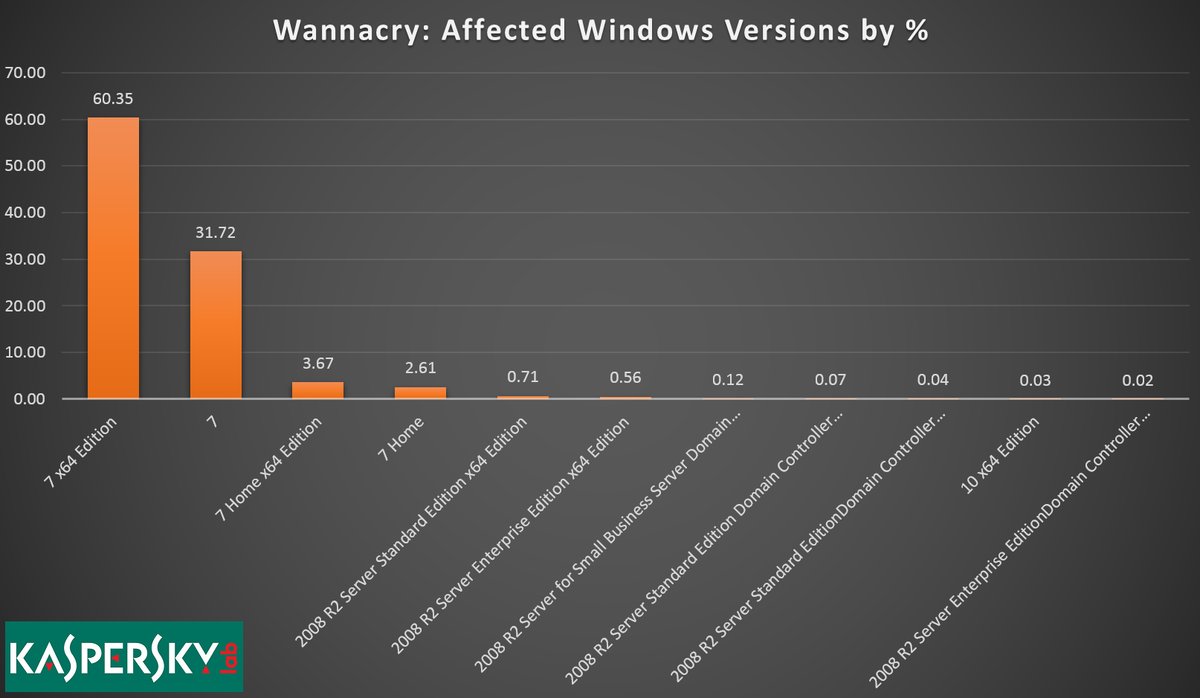
WannaCry exploits windows 7


Patch Remedy stops WannaCry from exploiting Windows7

Plugins4Automate has developed a plugin for LabTech / Connectwise automate that helps with keeping Microsoft products updated with the latest WUA versions. This assistance provided to Labtech allows for more consistent update deployments across all Windows OS types. This proactive approach to patch management helps MSPs prevent such outbreaks like the WannaCry work that hit this last week.

Patch Remedy posted this week how they help prevent breakouts across the MSPs using the Patch Remedy product to keep their Windows systems fully patched.

For more information on how Patch Remedy can resolve your Labtech and Connectwise Automate patching issues please visit Patch Remedy at Plugins4Automate.com

Linux Patch Management for Automate, formerly LabTech

In most MSPs, Linux is a small if any footprint in their overall service offerings and this is reflected in the support given to these systems within the RMM tools they use.  MSPs often pass on managing Linux agents as the RMM tool they have available to them does not lend itself to managing Linux patching and updates.

Demand drives the development of the tools we use and we all know that Windows OS reigns supreme in the managed businesses realm. With MSPs looking to save every dollar where they can, they are not hiring techs to man the helpdesk that are Linux hardened vets. If they are lucky to have 1 guy that knows his way around BASH, he tends to be closer to management. They also most often overlook these systems in any maintenance plans the RMM tool is providing. This tends to leave Linux systems that are widely considered the workhorses of the Internet grossly under patched and vulnerable to exploits.

Like any MSP we had similar issues with maintenance plans as techs came and left taking skill sets with them. It was hard to keep up with managing maintenance when the previous engineer was very Linux savvy and the incoming engineer is not. Where do they pick up and go with patch management of these systems?

In comes a patch manager for Linux that plugs into LabTech, Linux Update Manager.

Plugins4LabTech decided to jump in and help give MSPs the ability to have a standard method and interface inside LabTech that they could use to determine what systems they have. MSPs can know what updates are available for each system and the ability to automate the installs of patches and updates. MSPs can determine if they have systems that have pending updates or pending reboots due to updates.  See what update versions of packages are available and the ability to manually run updates or update a single package.  The first release has basic automation controls for unassisted updating but the P4L team assures us there is several big expansions they want to add to the plugin to include detailed scheduling of updates, ticketing and alerting.

What to try the new Linux Update Manager plugin for free, or visit http://www.plugins4labtech.com

New premium Office 365 for LabTech plugin


Plugins4Labtech (P4L) has reached a milestone with our Office 365 for LabTech plugin. After years of development, accolades from LabTech and managed service providers (MSPs) across the globe, we are finally ready to promote our Office 365 for LabTech plugin on www.plugins4labtech.com.

P4L is moving the Office 365 for LabTech plugin out of the development/beta phase (free) and into main production (premium plugins). This comes after several new improvements to the plugin and the successful trials of the plugin over the last six months. P4L would like to thank all the people involved with the testing and trials of this very inventive plugin. P4L also wants to thank everyone who helped with the strenuous testing allowing us to put together a very powerful tool. Trial (free) versions of the product’s license will expire on January 31.

We recommend users download the latest version of Office 365 for LabTech now.

Office 365 for LabTech is now a premium plugin that allows the collection of data and maintenance of Office 365, Azure and SharePoint services. From simple password unlocks for end users to setting ”out of office” messages for users’ email boxes, the Office 365 for LabTech plugin has what the help desk at your MSP needs—quick and easy access to common tools to manage Office 365.

P4L hopes you will come and join in the revolution of technology. Use P4L as your partner to automate.

Stalled Agents Detector For Labtech Automate


Sometimes you have a number of machines where the LT agent gets stuck in an “executing” state. When this happens the only thing the machine will do is check in to the LT server. Solution is a reboot or restart of the LT service. Stalled Agents plugin helps identify and allows you to repair these agents when this happens.


Plugins4Labtech has created a new  plugin for LabTech that is easily installed into the LabTech RMM platform (Connectwise Automate). This plugin finds and lists systems with executing commands and shows you how many each agent has currently running. Agents with excessively high numbers are more likely stalled (not responding to commands). Typically you would need to cancel the executing commands and restart the LabTech agent services to resolve. If the agent is not processing all the other commands it will not process a restart agent command. The only methods are to have local user restart service which is very manual and time intensive. This also shows you have a whole in your coverage if local users are needed to manage system. The next option is to try some remote control access which is very manual and time consuming.


We have a better idea!

Our plugin has 2 options to handle this remotely, the first is using RPC from one agent to another to kill and restart the agent and the second is to use RMM+ for ScreenConnect to issue remote commands bypassing the LT agent.

This makes a great tool for any MSP using Labtech. Come check out this plugin and many other free plugins available for LabTech (Connectwise Automate) at www.plugins4labtech.com


VMWare ESX Hardware Health monitor for Labtech

headerlogo


Plugins4LabTech has created a new plugin that will monitor the CIM data announced by the hardware running VMWare ESX software. We can report on any hardware that follows CIM standards and makes it’s hardware statuses known to VMWare. This simple to use plugin deploys in just minutes and can be setup by anyone with little or no  knowledge of LabTech functions and processes. If you want to see in action the easiest ESX Hardware Health Monitor available for LabTech then have a peek at our video on our YouTube Channel.


Never be in the dark again over hardware health!


Get alerts and tickets when hardware failures are detected. Using the monitor agent supplied with the plugin get quick responses to failures and warnings directly from VMWare. When alarms happen get emails, tickets and messaging alerting you to the failure that is taking place on the hardware.

Plugins4LabTech’s VMWare Health Monitor plugin for Labtech uses an agent to talk to VMware ESX hosts and retrieves the CIM data for the hardware the ESX host is running on. The plugin processes this data and stores it in LabTech’s database to be used in the views and alarms the plugin issues when failures are seen. You will see data on your RAID arrays and SCSI controllers, Power Supplies failures and system overheats. If the hardware is reporting it to VMWare we can see it.


Main ESX Health Monitor Console

The main view lets you see all the ESX hosts under management sorted by Client. In this view you are able to turn on and off the collection of data, set the interval of how often the data is collected and enable alerting for any seen failures.

ViewMenu


ESX Health Monitor Client Console Tab

The Client Console tab is where you would add and delete the ESX Hosts you want to monitor. You are able to force the update of ESX CIM data by selecting to rescan ESX hosts and you can view the full CIM data list of any ESX Host.

Clienttab


ESX Health Monitor CIM Data

The CIM Data view shows all the collected CIM data on a given ESX host. If any data is in a state not considered ok then those lines will be represented with warning and alarming icons. You will also get the hardware manufactures data back and in the case of Dell that is the Hardware type and Service Tag.

CIMData


ESX Health Monitor Internal Agent

Under the main view you can select to enable alerts. When you do this agent is created in the internal monitors of LabTech. You can use this monitor to email, ticket, alert or message anyone when failures are picked up.

monitor

A simple plugin all self contained and easy to deploy.  Just a few clicks to configure and you have data. So easy to use anyone can setup and have it working in just a few minutes.


The plugin is currently with the Squid Squad getting a final review before we release the new plugin. Follow our release notes at http://support.plugins4labtech.com

download


Magma for LabTech – Get your graph on!

logo1


Magma, a Monitoring And Graphing Management Archive is a very versatile platform to monitor just about anything you can come up with. If you can get a message or a counter from the device you should be able to monitor and graph that device in LabTech using Magma for LabTech.

Magma for LabTech integrates directly into the LabTech RMM tool providing quick and upfront views of the statues of your clients and the monitors beneath them.

mainview


Follow the yellow brick road


Magma for Labtech is all about the colors and the visuals are really easy to understand. By using common colors and icons to represent a visual heath spectrum,  the monitors stand out where they may not be seen as easily in other solutions. For example, In the picture above we see “Green“, green is good but as you look further you can see both diamonds and smiley faces depicted for each client we have activate monitors for. This minor change in the visual spectrum lets you know that recent events have happened with the P4L client at some point in the last 24 hours,  where diamonds depict the nothing has changed for this client for at least 24 hours. This varying degree of good helps you quickly determine where your time and review should be spent.


clientview


When we select that client we drill into all the monitors we have set up for that client. We can then see what items being monitored have changed in the last 24 hours.


monitorview


Open up a monitor and see what it has been doing over time and what it is doing right now. From our graph we can see that this system’s disk stopped getting data for a period of time last night. The Windows system was in hibernation and was not sending data back during the night.


history-view


Using the History button you can see the history of health and wellbeing of the monitors you have deployed.

Multi Graph Timelines


multigraph


Reach back in time to see data graphed over a 2 year period with just 1 click of your mouse. From the monitor’s view you can access years of metrics for any monitor, drill down into the graphs using a simple drawing tool provided by each graph to get up and close to your data.


Don’t be left out in the cold


daily-sum-types

With all the different event states a monitor can be in Magma makes it easy to see what events are taking place and in which state those monitors may be in at any given time. Get Daily , Weekly , Monthly and Yearly metrics on all your monitors.


Your data on the go


smartphone

Need access to your MSP’s health on the go! Get all this great data just as you would in LabTech but right on your smartphones. Never be more that a thumb press away from the health of your clients and your MSP.

magma-IPhone


It’s all about the Uptime


When a client comes asking about the availability of their website, their servers or their line of business apps what do you tell them?

search-availability


Availability reports are key to knowing how well a services is performing. Being able to pull up at will the availability of any system or monitor and project back over time for that data is priceless. Even export the data out to Excel with a click of a button for usable and reportable data.


 Show me the nines

Ask any engineer about availability and they will tell you, “It’s all about the nines(9)”, like in %99.999 availability. Do you know what your availability is? Get it for any time period, at any time you like day or night, that is Magma for Labtech.

availability


Magma for LabTech is comprised of a single MAG Server / Service and the LabTech Plugin Integration which allows full management of your environment.  The MAG server deploys a custom version of Xymon that delivers the processing and storage of your archives and the stepping point for external testing monitors like web, dns and mail services that need to have reach from the outside real world. MAG does not only probe but accepts probes allowing a very fluid ability to collect data from just about any source that has access to the Internet.  Whether you need to monitor a heat sensor in a server room or the QOS of a router Magma for LabTech can visualize it.


Magma for Labtech is still under development but from our screenshots you can see it has come quite far. A general beta may be available in the coming weeks so watch for our announcments on our support.plugins4labtech.com site. If you have any questions, feature requests or comments feel free to post up on our forums as well.


Get Magma at http://www.plugins4labtech.com

Are you left wanting more?

We thought you might be so we posted up a video preview of Magma for Labtech in action as we use it. This is just a limited view into the visual spectrum but should give you a taste of what is coming.


videoSee us on our YouTube Channel