RMMmax Introduces MCP — The New AI Automation Core for Modern MSPs

We’re excited to announce the MCP (Managed Companion Platform) — a fully integrated AI automation layer that gives your RMM environment 47 powerful, context‑aware functions for analysis, remediation, scripting, reporting, and system repair.

This is the moment AI becomes operational inside your RMM, not just theoretical.

The future of MSP automation just arrived inside RMMmax.

We’re excited to announce the MCP (Managed Companion Platform) — a fully integrated AI automation layer that gives your RMM environment 47 powerful, context‑aware functions for analysis, remediation, scripting, reporting, and system repair.

This is the moment AI becomes operational inside your RMM, not just theoretical.

🔧 What MCP Brings to Your RMM

The MCP transforms your environment into an AI‑ready automation engine that can:

  • Analyze endpoints, configurations, logs, and performance
  • Review system health and compliance across tenants
  • Report on issues, trends, vulnerabilities, and fleet‑wide insights
  • Create scripts tailored to your environment
  • Execute scripts safely through your RMM or the RMMmax Agent Service
  • Repair systems using automated, AI‑generated workflows
  • Document everything with clean, human‑readable summaries

All of this happens inside your existing RMM, using your existing agents, with zero backend exposure.

🔐 Security Built for MSP Reality

AI access is controlled through:

  • Team‑scoped secure tokens
  • Strict tenant isolation
  • Environment‑bound authentication
  • Full auditability of every action

Your RMM stays protected. AI gets only what it needs — nothing more.

⚙️ No Extra Setup. No Extra Licensing.

The MCP deploys automatically as part of RMMmax 2.0. If you’re running RMMmax, you already have it.

If you’re new, you can start with 25 free agents and experience the MCP firsthand.

🌐 Why This Changes Everything

For the first time, MSPs can let AI:

  • Investigate issues
  • Build scripts
  • Execute remediations
  • Validate results
  • Document the fix

…all without giving AI direct access to the RMM backend.

This is the new automation standard for MSPs — faster, safer, smarter, and built for real‑world operations.

ConnectWise Automate Plugin Automates Windows 10 Upgrades

The people over at Plugins4Automate have released the latest version of their Patch Remedy plugin for ConnectWise Automate which now upgrades older Windows 10 versions to current Windows 10 versions. For quite some time Patch Remedy has worked to keep each version of Windows 10 up to date inside of its version but today Patch Remedy goes to the next step and upgrades older versions of Windows 10 to the latest 1709 version. Plugins4Automate worked with the LabTech community to create a tool to assist MSPs with the daunting task of upgrading Windows 10 versions using ConnectWise Automate.


They have user interactive controls for Windows 10 Upgrades,  If users of a PC are logged in during upgrades, setup a special message to be displayed during the upgrade process.


These tools allows a MSP to easily upgrade 1 or hundreds of Windows 10 systems at one time. If your MSP needs a Windows 10 Upgrade solutions then Patch Remedy is a must see.

Try Office365 For ConnectWise Automate For 1 Month Free

Office365 for ConnectWise Automate

The team over at Plugins4Automate is offering a great value to try out their new Office365 for ConnectWise Automate plugin. Get the first month free and have a go at this great plugin. Here is just a few of the neat things you can mange.

Azure Active Directory

Need to add a new user, re-enable a user after lockout or just manage a password change, you can perform quick tasks in Office365 directly from your Labtech consoles.

MSOL Exchange

Need to add a forwarding address or maybe convert a users mailbox to shared, set a users Out Of Office replies or view their current mailbox stats, with our Exchange integration you have access to Exchange online with just a few clicks inside of LabTech

Sharepoint Cloud

Create new sites or manage users and groups for existing sites quickly and easily inside of LabTech.


For more information about this plugin and how to get started visit:

Get Office 365 For Free

Monitoring Your Clients VMWare Infrastructures.

Who manages your VMWare ESX Hardware Health?

If you are using ConnectWise Automate or LabTech RMM tool then this is a must have plugin for your environment. Plugins4Automate has a great plugin for managing ESXi Health monitoring in ConnectWise Automate and LabTech.

Visit them at www.plugins4automate.com

ConnectWise Automate New CCleaner Business Edition Plugin Analyzes Unlimited Agents


CCleaner Business Edition Gives MSPs a Boost.

Plugins4Automate released a new CCleaner for Labtech plugin that has some really great features available at no cost to any MSP that uses ConnectWise Automate / Labtech for managing mass endpoints. The plugin leverages the power of the CCleaner engine to analyze unlimited agents and bring that information back into ConnectWise Automate. Once the data is collected you can use that data to determine the amount of reclaimable storage available to each client.

Want to give CCleaner for Labtech a try?

So Many New Features To Point Out

Here, here, here and here… There are so many new improvements for the CCleaner for Labtech plugin that you will need to go visit the official announcement.

A New License Manager

The plugin does not require a license but when you are ready to get serious about storage reclamation and security then you will want to invest in getting a CCBE Key from your LabTech / CW Sales team.


See how CCleaner For Labtech can reclaim storage for your clients and restore security and privacy for browsing applications.


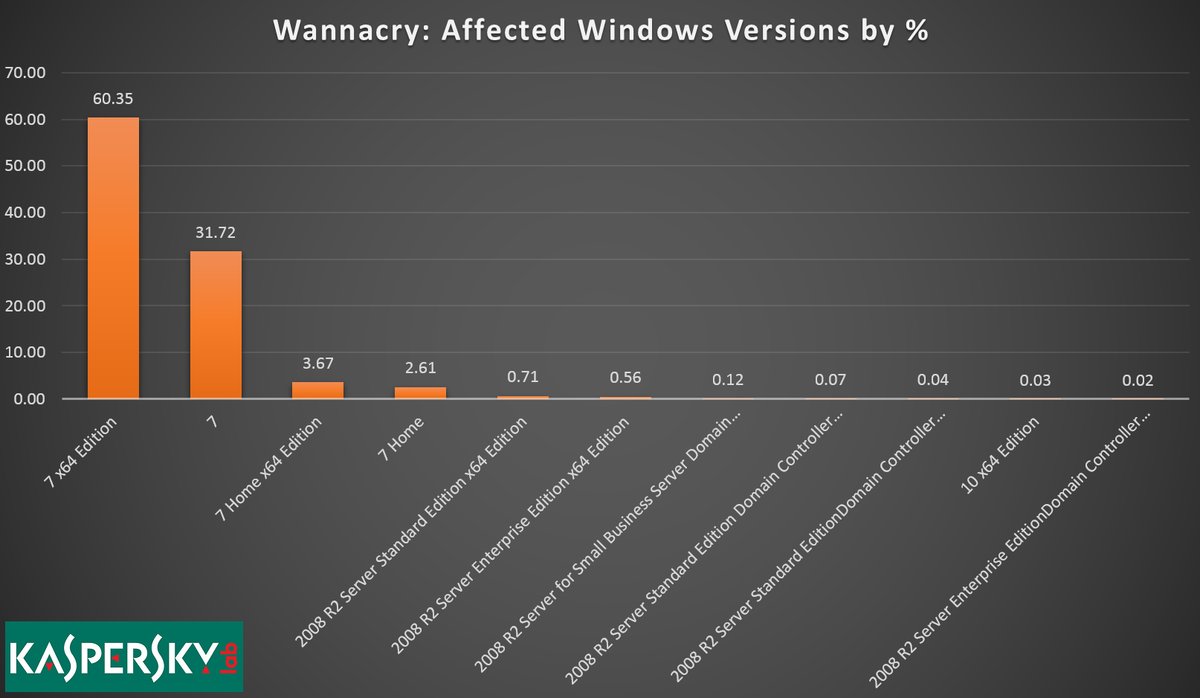
WannaCry stopped in it’s tracks with the help of Patch Remedy for Connectwise Automate

WannaCry exploits windows 7


Patch Remedy stops WannaCry from exploiting Windows7

Plugins4Automate has developed a plugin for LabTech / Connectwise automate that helps with keeping Microsoft products updated with the latest WUA versions. This assistance provided to Labtech allows for more consistent update deployments across all Windows OS types. This proactive approach to patch management helps MSPs prevent such outbreaks like the WannaCry work that hit this last week.

Patch Remedy posted this week how they help prevent breakouts across the MSPs using the Patch Remedy product to keep their Windows systems fully patched.

For more information on how Patch Remedy can resolve your Labtech and Connectwise Automate patching issues please visit Patch Remedy at Plugins4Automate.com

P4L wants the Good, Bad or Indifferent opinions you have about their LabTech Plugins

Plugins4LabTech is having a contest and they are giving away a subscription to Surflog to 1 lucky participant. All they want is your honest opinions on the plugins you use. If you think your MSP will benefit from a free year of Surflog then go visit www.plugins4labtech.com and post your reviews.


Labtech Plugin – Warranty Master

warranymasters-logo


Keeping Connectwise Warranties Up to Date


Free of charge, that’s right! Warranty Master perform continuous warranty lookups (and updates) of your ConnectWise device assets and if you upgrade to Pro Edition you’ll also get eye-popping, masterful reports and features.

Warranty Master™ takes the guesswork out of managing warranties, generating sales opportunities for you and reducing risk for your customers and using Squidworks LabTech plugin for Warranty Master keeps that data in front of you and quickly accessible directly from your LabTech consoles.

mainview


Simple to find and navigate to, just select the Warranty Master menu from the View Menu bar.

menuitem


 Version 1.0.1 now Available

download


Connectwise SQL Query -> Get resent invoiced customer contact list for Microsoft Partner Survey

Do we have any Connectwise Sql hackers out there that might need a SQL script to grab a list of all primary company contacts for all companies invoiced over the last 6 months so you can submit that to Microsoft Partner Portal for the survey Microsoft expects you to send out twice a year?  You know the one where you submit a excel spreadsheet of those customers and Microsoft send them a survey on your behalf.

Well here is a quick SQL Query that will produce that very list for you. Just export to a tab delimited text file.


SELECT [dbo].[v_Company_Contact].[Company_Name], [dbo].[v_Company_Contact].[First_Name], [dbo].[v_Company_Contact].[Last_Name], [dbo].[v_Contact_Communication_Type].[Description] AS Email,[dbo].[Contact_Communication].[Description] AS Phone
FROM [Your Database Name].[dbo].[v_Company_Contact]
JOIN [dbo].[v_Contact_Communication_Type] ON [dbo].[v_Contact_Communication_Type].[Contact_RecID] = [dbo].[v_Company_Contact].[Contact_RecID]
JOIN [dbo].[Contact_Communication] ON [dbo].[Contact_Communication].[Contact_RecID] = [dbo].[v_Company_Contact].[Contact_RecID]
WHERE Company_RecID IN (SELECT Company_RecID
FROM [Your Database Name].[dbo].[v_rpt_Invoices]
WHERE Date_Invoice between (‘01/01/2012‘) and (‘07/01/2012‘)
Group By Company_RecID)
and [dbo].[v_Company_Contact].[Default_Flag] = ‘1’
and [dbo].[v_Contact_Communication_Type].[Communication_Type_RecID] = ‘1’
and [dbo].[Contact_Communication].[Communication_Type_RecID] = ‘2’


Find the line in the query “WHERE Date_Invoice between (’01/01/2012′) and (’07/01/2012′)”  and change the dates for any range you want to include also change the name of the database to reflect your CW database. WordPress changes ( ‘ ) in to ( ` ) when you copy and paste SQL query so you may need to go through query and revert them back to ( ‘ ). See dates and any thing that has a “=” before it.


I hope my SQL Foo helps some one out there in Connectwise land


Cubert 😎