Free Chocolatey for ConnectWise Automate For A Limited Time

Get Chocolatey Version 3 Beta Through September 2017


Plugins4Automate is giving away Chocolatey for Automate through September 2017!

Come grab some Chocolate for your Connectwise Automate RMM Platform. 3rd Party Application Management made easy!


MSPs can install and update their complete environment of Windows systems in a very simple to use interface. In fact, managing software applications could not be easier when using the Chocolatey For Automate plugin for ConnectWise.

Read More …


Patch Remedy Pushes WUA Version 7.6.7601.23775 to Windows 7 and 2008 R2

Today Plugins4Automate released Build 1.0.3.62 for Patch Remedy for ConnectWise Automate / LabTech. In this new build they have re worked how they update the Windows 7 and 2008 R2 systems making it more streamline as they raise the level of WUA version between each rollup Microsoft has released.

To read more of what’s new with Patch Remedy and how it can help prevent worms like WannaCry visit the latest blog post on Patch Remedy here

WannaCry stopped in it’s tracks with the help of Patch Remedy for Connectwise Automate

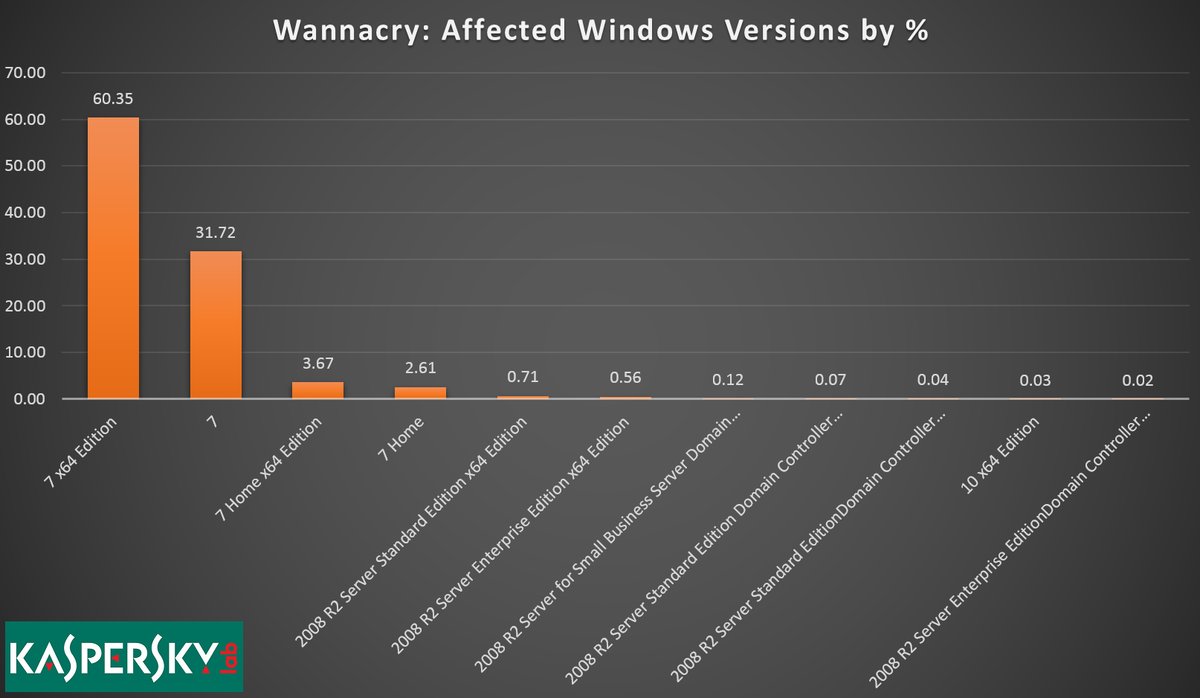
WannaCry exploits windows 7


Patch Remedy stops WannaCry from exploiting Windows7

Plugins4Automate has developed a plugin for LabTech / Connectwise automate that helps with keeping Microsoft products updated with the latest WUA versions. This assistance provided to Labtech allows for more consistent update deployments across all Windows OS types. This proactive approach to patch management helps MSPs prevent such outbreaks like the WannaCry work that hit this last week.

Patch Remedy posted this week how they help prevent breakouts across the MSPs using the Patch Remedy product to keep their Windows systems fully patched.

For more information on how Patch Remedy can resolve your Labtech and Connectwise Automate patching issues please visit Patch Remedy at Plugins4Automate.com

New premium Office 365 for LabTech plugin


Plugins4Labtech (P4L) has reached a milestone with our Office 365 for LabTech plugin. After years of development, accolades from LabTech and managed service providers (MSPs) across the globe, we are finally ready to promote our Office 365 for LabTech plugin on www.plugins4labtech.com.

P4L is moving the Office 365 for LabTech plugin out of the development/beta phase (free) and into main production (premium plugins). This comes after several new improvements to the plugin and the successful trials of the plugin over the last six months. P4L would like to thank all the people involved with the testing and trials of this very inventive plugin. P4L also wants to thank everyone who helped with the strenuous testing allowing us to put together a very powerful tool. Trial (free) versions of the product’s license will expire on January 31.

We recommend users download the latest version of Office 365 for LabTech now.

Office 365 for LabTech is now a premium plugin that allows the collection of data and maintenance of Office 365, Azure and SharePoint services. From simple password unlocks for end users to setting ”out of office” messages for users’ email boxes, the Office 365 for LabTech plugin has what the help desk at your MSP needs—quick and easy access to common tools to manage Office 365.

P4L hopes you will come and join in the revolution of technology. Use P4L as your partner to automate.

How-to keep a user synced with DirSync, to be excluded from DirSync while retaining the AD user

Converting DirSync User to a Cloud user in 365

I’m not sure if anyone has run into this problem before, so I figured I would share a quick fix that I found to take care of this problem. The easiest process that I have found to accomplish this without having the user be deleted each time dirsync runs is the following:

  • On a domain controller in the environment, move the user out of the DirSync scope. The Domain has a Synced and UnSynced OU, moving the user to the UnSynced OU accomplishes this.
  • Force replication on the DC a few times (unless there is only one DC in the environment)
  • Login to Office 365 and delete the user from Office 365- this will put them in a soft-deleted state.
  • From a DC in the users environment, run all of the DirSync/Azure AD Sync profiles to allow the changes to sync with 365
  • From Office 365 web portal, find the users mailbox in the Deleted Users section, select the appropriate user and re-attach the mailbox. You will need to specify a new password for the user to use when accessing Office 365 since they are no longer synced with AD.
  • Open up a PS-session to Office 365, Import the appropriate modules including MSOL modules
  • Run the following command substituting the appropriate value. The ImmutableID is what will prevent DirSync from deleting the user’s mailbox each time it is run. ImmutableID links the 365 account to the AD account and is what DirSync looks at to bind the two accounts (generally speaking).

    Set-MSOLUser -UserPrincipalName %user@domain.com% -ImmutableID $null

  • From a DC in the user’s environment, run all of the DirSync/Azure AD Sync profiles to allow the changes to sync with 365
  • Validate that you can login via Office 365 with new password and that the account shows being in the cloud.


Good Luck!

CCleaner for Labtech As A Security Tool

linkedin-post-header

The recent announcement that LabTech Software is managing the the sale of CCleaner for Business licensing and  providing free of charge the popular CCleaner for LabTech plugin developed by the Plugins4LabTech team is huge for the LabTech community. Every MSP knows the benefits of using CCleaner to maintain disk space and reduce junk on client PCs but most are unaware of the amazing security tool they have as well.


CCleaner a security tool? Absolutely, CCleaner is a great security tool to assist in maintaining password policies across the client and reducing the exposed footprint of the end users. Just have a look at another plugin provided freely by Plugins4LabTech called PassPort. This plugin scans the MSP’s client base for saved password and account info. It pulls this data directly out of the local windows PCs across the MSPs clients and brings all that data back to LabTech. This tool represents just how easy it is to get to this data and if you can get it, anyone can get it. CCleaner for Labtech can help prevent this data from reaching the wrong hands.


CCleaner for LabTech does this by automating the cleaning process across the entire MSP.  By forcing a daily cleaning of all Browser Cache, Saved Passwords and Cookies will reduce the attack surface of each PC and trains the users to be more security minded by prevent them from getting value from saving passwords and allowing tracking and monitoring cookies to follow user’s browsing history.

For pennies a month a MSP can plugin to this powerful tool and really provide a value to their clients while helping to keep them safe! For more information on how to get CCleaner for LabTech please reach out to your LabTech Sales team. They will be glad to assist you and get you going with this great tool.


Also check out http://www.plugins4labtech.com for a complete list of free plugins for LabTech Software.

Magma for LabTech – Get your graph on!

logo1


Magma, a Monitoring And Graphing Management Archive is a very versatile platform to monitor just about anything you can come up with. If you can get a message or a counter from the device you should be able to monitor and graph that device in LabTech using Magma for LabTech.

Magma for LabTech integrates directly into the LabTech RMM tool providing quick and upfront views of the statues of your clients and the monitors beneath them.

mainview


Follow the yellow brick road


Magma for Labtech is all about the colors and the visuals are really easy to understand. By using common colors and icons to represent a visual heath spectrum,  the monitors stand out where they may not be seen as easily in other solutions. For example, In the picture above we see “Green“, green is good but as you look further you can see both diamonds and smiley faces depicted for each client we have activate monitors for. This minor change in the visual spectrum lets you know that recent events have happened with the P4L client at some point in the last 24 hours,  where diamonds depict the nothing has changed for this client for at least 24 hours. This varying degree of good helps you quickly determine where your time and review should be spent.


clientview


When we select that client we drill into all the monitors we have set up for that client. We can then see what items being monitored have changed in the last 24 hours.


monitorview


Open up a monitor and see what it has been doing over time and what it is doing right now. From our graph we can see that this system’s disk stopped getting data for a period of time last night. The Windows system was in hibernation and was not sending data back during the night.


history-view


Using the History button you can see the history of health and wellbeing of the monitors you have deployed.

Multi Graph Timelines


multigraph


Reach back in time to see data graphed over a 2 year period with just 1 click of your mouse. From the monitor’s view you can access years of metrics for any monitor, drill down into the graphs using a simple drawing tool provided by each graph to get up and close to your data.


Don’t be left out in the cold


daily-sum-types

With all the different event states a monitor can be in Magma makes it easy to see what events are taking place and in which state those monitors may be in at any given time. Get Daily , Weekly , Monthly and Yearly metrics on all your monitors.


Your data on the go


smartphone

Need access to your MSP’s health on the go! Get all this great data just as you would in LabTech but right on your smartphones. Never be more that a thumb press away from the health of your clients and your MSP.

magma-IPhone


It’s all about the Uptime


When a client comes asking about the availability of their website, their servers or their line of business apps what do you tell them?

search-availability


Availability reports are key to knowing how well a services is performing. Being able to pull up at will the availability of any system or monitor and project back over time for that data is priceless. Even export the data out to Excel with a click of a button for usable and reportable data.


 Show me the nines

Ask any engineer about availability and they will tell you, “It’s all about the nines(9)”, like in %99.999 availability. Do you know what your availability is? Get it for any time period, at any time you like day or night, that is Magma for Labtech.

availability


Magma for LabTech is comprised of a single MAG Server / Service and the LabTech Plugin Integration which allows full management of your environment.  The MAG server deploys a custom version of Xymon that delivers the processing and storage of your archives and the stepping point for external testing monitors like web, dns and mail services that need to have reach from the outside real world. MAG does not only probe but accepts probes allowing a very fluid ability to collect data from just about any source that has access to the Internet.  Whether you need to monitor a heat sensor in a server room or the QOS of a router Magma for LabTech can visualize it.


Magma for Labtech is still under development but from our screenshots you can see it has come quite far. A general beta may be available in the coming weeks so watch for our announcments on our support.plugins4labtech.com site. If you have any questions, feature requests or comments feel free to post up on our forums as well.


Get Magma at http://www.plugins4labtech.com

Are you left wanting more?

We thought you might be so we posted up a video preview of Magma for Labtech in action as we use it. This is just a limited view into the visual spectrum but should give you a taste of what is coming.


videoSee us on our YouTube Channel

Office365 for LabTech Pre-Release Feature Overview

0365Plugins4LabTech is about to release to the community it’s next generation of Office365 Management for LabTech


Plugins4LabTech has completely rewritten this plugin from the ground up. No longer are your required to go through a set of manual installs and system prep to use the plugin. No longer is your workstation tied to processing Office365 commands. No longer do you have to deploy MSOL scanners at every location that uses Office365.  No longer do you have to have a client systems collecting Office365 data. So say goodbye to all that luggage and say hello to the new and improved Office365 for Labtech.

Let’s go over some of the new innovations we have coming with this new plugin. Our biggest change comes in the form of a single pane of glass. We have moved all views into one master manager so you can flip from client to client without ever leaving the windows console you are in. This centralization does not stop at the user’s view but continues to the data collection and control systems. You now assign a single system anywhere across your MSP to manage Office365 for all your techs and clients. You can control what is collected and at anytime you can start a manual collection of data through the plugins control center.


The Control Center

Configure


The Control Center allows you to deploy all the MSOL modules you need to manage Office365 to your master scanner. If you find that you would like to use the Console Shell feature on your local workstation as well then you can select from the list of systems, your workstation PC and “Deploy MSOL Modules” to your workstation quickly. You can execute manual scans of all clients MSOL data, MSOL Statuses and more from this convenient window.  Verify when the last scans took place to know if your data is up to date and how many clients were scanned. We also monitor and display if your scanner is online and available and if we see it up to date with it’s MSOL modules. All this is done automatically when you install and add your clients. LabTech will execute scanner twice every 24 hours to keep all data up to date with the clients real world data so as to capture changes made from AAD Connect if active for clients.


Your Single Pane Of Glass

Main-Azure


The Office365 for LabTech console is pretty strait forward, At the top you have your active Office365 client list to select any client configured for Office365. From this view you get to manage the clients Azure, Exchange, Groups, Sharepoint sites and licensing usage along with the most recent MSOL hosting statuses for each client. Once a client is selected then their list of users becomes available for selection. By selecting a user from the list each tab will reflect that users information where relevant allowing you to manage many aspects of the user’s experience. In Azure you can manage new users, user passwords, unblocking a locked out user, setting strong password requirements and enabling and disabling many other features in Azure.


Azure Groups

Main-AzureGroups

Quickly manage new groups and removing old groups and Add and remove users from groups without ever leaving LabTech.


Exchange Management

Main-Exchange


Easily Convert user mailboxes to shared mailboxes saving your client license usage when archiving expired employees. Setting mailbox permissions quickly like Grant Send on behalf of, read only or full access to mailboxes for any user is a snap with Office365 for LabTech. Set forwarding addresses and manage a users Out Of Office messages and activity all right inside this single pane of glass.


Manage Sharepoint

Main-Sharepoint


Add and remove sites  from Sharepoint. Manage Sharepoint groups and members site access.


MSOL License Management

Main-Licensing

Get access to all the license information for your clients, see what service plans exist for each license the client holds and the usage of each license. Add and remove licenses for users quickly without ever leaving your LabTech console.


MSOL Status

Main-MSOLStatus


MSOL statuses keep you informed as to the state of the hosted services Microsoft is providing to your clients. Each client can have different status messages based on location of hosted services and the systems and services affected. These status messages are extensive and provide detailed information from Microsoft on the issues and resolutions completed.


The All Powerful MSOL Shell

MSOLShell

Our Holy Grail, The MSOL Powershell console, Launched from Office365 For Labtech’s single pane of glass, has also been rewritten from the ground up to include module loading management, new commandlets and a clean look. If you are one for shells then this makes it easy to launch a Powershell console for access to any clients data directly from your workstations (no login information required). Run commands and scripts directly from the shell accessing all the MSOL services the client is entitled to as the tenant admin.


Our plugin has a little something for everyone, Stats and metrics for the senior staff, High level control over clients settings and global data for you engineers and access to common tech functions like password updates and removing lockouts making Office365 for LabTech a must have tool in your Labtech Tool Belts. We are not stopping there, Plugins4Labtech development team is continuously adding new features and functions to this plugin allowing the plugin to grow as MSOL services change and develop.


Office365 for Labtech will be released to the general community on Monday, June 20th for the opening of Automation Nation. If you are going to be at Automation Nation come seek me out if you would like more information on this release.

Visit Plugins4LabTech.com for more information and downloads. Would you like to see a Demo of Office365 being used in LabTech?

apple-icon-114x114


Backup Windows for LabTech gets new Offsite Synchronization features

linkin-plug


The Plugin4LabTech development team has let it leak out that the next version of the Backup Windows for LabTech plugin will now include Offsite Synchronization as a standard feature in all new versions. This feature allows MSPs to Offsite the local backups with schedulable Sync times keeping mirrors of the local backup directory on storage services across the internet.

Developers at P4L went on to comment that all transmissions over the internet of backup files were encrypted and secure point to point. With all the security issues abound you shouldn’t have to worry about someone scarfing up you backups.  Shannon (a.k.a Cubert) said “We are not trying to reinvent the wheel here, we are using proven technology by long standing venders. So it just works.

Plugins4LabTech has now made it so that no MSP has an excuse not to have good quality backups as part of their offerings. No longer do you need to force consumers into expensive backup services to ensure a quality backup is maintained for your clients. You can also be assured that backup are safe offsite in event of a disaster event.

Virtualize Anywhere, Backups are created using Microsoft Virtual Disk format so all backups files are VHDX files that when mounted can become a Virtual Machine or be mounted as a hard drive. This makes it a great tool for disaster recovery, mount and recover just about anywhere using the tools you have within your Windows system. No special recover tools to download and maintain which is great when the fires are raging.

Automatic backup archive usage management means you will never run out of disk space on your target backup disk making backups worry free!
After you configure a disk for a scheduled backup, Windows Server Backup automatically manages the disk usage—you do not need to be concerned about running out of disk space after repeated backups. Windows Server Backup will automatically reuse the space occupied by older backups when creating new backups. The management tool displays the backups that are available as well as the disk usage information. This can help you plan for provisioning additional storage to meet your recovery objective.


To get more information on this plugin and all the other plugins Plugins4LabTech offers please visit Plugins4LabTech.com


Backup Windows for LabTech

logo-web

Integrated LabTech Backups

Squidworks released today the most cost effective backup solution integrated with LabTech available, coming in at a whopping $1 per agent!

If you are like me, then backups are pretty costly at an average of $40 dollars a server license. If you have a 100 servers to backup, then your monthly bill is $4,000.00 per month; at 12 months is $48,000.00 dollars a year for backup software. What if I told you we can do the same thing, with even more built-in LabTech features and at just $100 bucks?  Yes, $1200 bucks a year is all it will cost the average MSP with 100 server agents to backup every server they manage. For those occasions where you need more, $125.00 bucks get you unlimited agents! Backup every Windows 7 to Windows 10 system and Windows 2008 to Windows 2012 R2 you manage for a single flat fee. Have all the power LabTech can give you with mass management to control and monitor your backups. Get great logging, metrics and history from our intuitive gauges and graphs or see in just a single click where you stand with the safety of your clients files. No guess work needed!

Take command of your backups again!

Here is a peek at what they been working on. Everything you see done here is done inside LabTech never touching the end PC.

Backups a system in four steps

BackupJob


Restore a system in 4 steps

RestoreFiles


See and access available restore points

AvailableBackups


See available event logs relevant to backups

EventLogs


See your global statuses fast and easy

GM-Manager


Easy to understand metrics

GM-Metrics


See individual and global restore point time lines

GM-History


Get the plugin at