Kaseya Agent Procedure – Make A Mac Sing A Stupid Song

Cubert has noting better to do with his time then to play with the Text to Speach functions available on a Mac. Well today he has put together a smaill Kaseya Agent Procedure that sings a little song to to the unspecting user of a Mac system.  Just import the script and launch it against the unsupecting to get a quick laugh. You can do one further by modifing the script and using it to announce the start or finish of a script or process your running on a users Mac. A good example of this would be to announce to the user that backups have started and to not sut down the system untill the voice tells you to.

Download – > Kaseya Agent Procedure_Make_Mac_sing_stupid_song

There is a lot fo things you could use this for but the funnest of all is to just let your imagination run wild!!


You can edit the script and change the voice sytles, the text it speaks or the volumn you want to set for the speakers.


Enjoy


Cubert

WiFi Pineapple? More like a WiFi Grenade!

WiFi Pineapple discovery!


I came across this little jewel at a Kaseya  Connect conference in Vegas in 2012, as a victim of this little  bastard with my IPad ID up on display for all to see at the conference. I was intrigued . Yes Cubert logged on to a Kaseya Conference Free Wifi the day before and the IPad remembered the network and along comes this security guru guy, plays a little trick on the unsuspecting convention goers by dropping a Jasager WiFi Pineapple “Grenade” (Pineapple + Karma + DNS Spoof + SSLStrip + URL Snarf)  in the middle of the conference main gallery. So there I am checking my mail and Ebay’ing for a newly used Harley RoadKing when it got really slow and the  connection, all of a sudden seemed  like the wifi signal started to suck. I poped open the available networks and found that I was connecting to the Kaseya SID but right beside it was the real SID the guru was using to acces his WiFi Pineapple but the Pineapple would answer for any SID you had ever connected to.

 Cubert – “I’ve coined the phrase Pineapple Grenade, You take this this little bastard and lob it into the middle of a pubic room like a grenade and the results can be deadly! Facebook will never be the same.” 

Holy Shit!!


Next thing I know I am one of many Vegas conference junkies that was on display for all to see. I will tell you I was bummed… I consider myself a…  well an above average computer guy. Linux is an old friend, and I have worked  on the platform for almost 2 decades. I remember building for fun over a weekend LFS (Linux from Scratch) when it was in it 1.0 series several times because my programming buddy at college kept formatting my build drive .  The makeup of the Pineapple Mark IV is not foreign  to me at all, I was so intrigued that I looked up Hak5 and ordered one as soon as I got home from the conference as many I bet did.. $89.00 dollars plus shipping of $6.00 for a total of $92 dollars gets me a nice prebuilt compact wireless linux box with tools to play man in the middle to any public wireless service any where? What a Deal!


Delivery Day!


So I crack open my package I received from Hak5 and there it was, my very own WiFiPineapple. Well I could not wait to jump in and start playing with all the neat things this little bastard could do. I read over the little pamphlet that came with it. It gave you the basic low down on what this this WIFi Pineapple does and a very simple explanation of how it works. That is pretty good, as a basic Windows Geek will have issues understanding a lot of the routing and backend modifications this basic OpenWRT linux wireless unit will require to make use of the product. With a nice little interface and several tools, the expectations that you have the knowledge to take it to the next level is required.


Warning, Be Smart!


So feel safe some what in he fact that not every kid with a PC has one but “before warned” it is out there and you will need to be mindful that there is no wireless AP that is safe or secure as a  connection to the Internet. Never do any banking or other secure service over a free WiFi!! You have been warned! SSL is not secure and is meaningless to a device like this. They will own you if you are not paying attention.  Be smart people!


For more information on the WIFI Pineapple Mark IV goto WiFi PineApple


I will be writing up my experiences and sharing the knowledge on how this works and what it can do so watch for my posts on the WiFi Pineapple Mark IV.


Until then,

Hola

Cubert  8-).


[Kaseya Agent Procedure] Mac OSX and Windows – Send A Friend a YouTube Video Surprise!

Kaseya YouTube Me Script Plays Youtube videos on desktop inside a player.

Here is a script that carries a warning, Use Wisely… I am not responsible for misuse! If you play porn on the bosses PC why he is in a meeting with the board of directors I am not liable for your termination and or execution depending on the boss…

Now with that disclaimer said here is what I made for you. This script will “based on the OS installed” (Windows) copies a portable version of VLC to c:\temp and runs it with a URL as a option or (Mac OSX) Downloads a DMG of VLC and installes it if not found already on system and then runs the same URL.

The URL is a cartoon of a stick guy beating himself to death while a stupid song plays in the backgrond. It will pop up on the desktop of the user logged in and if the speakers are up it may be a jolt!

Here are the files you will need

The script -> Procedure YouTube Me

WIndow Portable VLC -> Windows VLC

Mac OSX VLC (dmg)    vlc.2.0.1 

Download all 3 files and upload the VLC files to your VSA SharedFiles Folder. Edit script after importing it into Kaseya and make sure you do not have any red lines in code. If so you may have file location issues, check where you uploaded VLC files. Post here any good YouTube URL to use for script.

Have fun

Cubert 😎


[Kaseya Agent Procedure] Mac OSX Diagnostic data collection scripts

Collect Application, Network, Firewall, Ethernet and Diagnostic information from Mac OSX

Download Here -> MacOSX Diagnostics

Cubert (Me) has been tasked with learning and creating useful scripts for Mac OSX systems. Here are some of the first scripts to come out. Our techs requested after the first week using the tools in Kaseya what would help make job just a bit easier and they reported back wanting some basic information stored in Kaseya that keeps them from having to access system to confirm settings.


That spawned on a quick set of scripts that go out and collect the following information and stores it in a text file inside Kaseya available in the “Get File” area inside LiveConnect -> Agent Data Select Get File tab or during a hover over a orb when pop out information window shows up you can click “Get File”. Each file is named based on test run and makes for quick access to Applications and firewall settings.

Enjoy

Cubert  😎

[Solved] iTunes – The procedure entry point sqlite3_dll wal checkpoint could not be located in the dynamic link library SQLite3.dll

iTunes 10 Fails to Backup iPhone or log in to iTunes Account

This week I was presented with a new problem.  A user was unable to back up her iPhone, log onto her iTunes account. Or run any updates on the device. Very frustrating for the user.  To top it off, every time her computer booted up, she received the following error:  “The procedure entry point sqlite3_dll wal checkpoint could not be located in the dynamic link library SQLite3.dll.” or similar error with Mobile update in the text also appeared.

After uninstalling  all apple products and re-installed iTunes, the problem still persisted.  Usually, when going to the iTunes store and no music shows up, a simple net winsock will fix the issue, however no dice here.  After some research, it appears that this is an issue that happens with some iTunes 10 installs.   It appear that this sqlite file does not always get placed in the appropriate area.  Anyway, if you come across this problem here is the fix.  I don’t think I have ever seen a client rush to buy music, as she did today!

To fix the dll error, go to this folder:
C:\Program Files\Common Files\Apple\Apple Application Support
Right click and copy this file.

SQlite3.dll
Next, go to this folder:
C:\Program Files\Common Files\Apple\Mobile Device Support
Right  click and paste the file into the folder.

You don’t have to delete the file from the copy location, it actually needs to be in both places.


Good luck


Cubert 😎

[Solved] IPhone passes Exchange 2010 setup but then gets ‘Cannot Get Mail. The connection to the server failed’

So your IPhone is not getting Exchange email after setting up your account and it verifying the account during the setup?

Here is what may be going on.

The ‘Cannot Get Mail.  The connection to the server failed’ error may be the cause of a simple mis-configuration in the Microsoft Active Directory services for that user. To see if it is this issue you will need to open the Active Directory Users and Computers, Select the VIEW menu from the top and click on “Advanced Features”. Now open the properties on the user having the issue and select the “Security” tab. Under this tab will be windows with user accounts listed and a “Advanced button” at the bottom. Select this button and find the check box “Include Inheritable permissions from this object’s parent” . If this is the problem you will find the box “unchecked”. Just check the box and try again. You should see mail start to flow.


Enjoy

Cubert

😎 BigMACDaddy 😎


New BBWin GUI Version 2 Release for BBWin XYMon Client

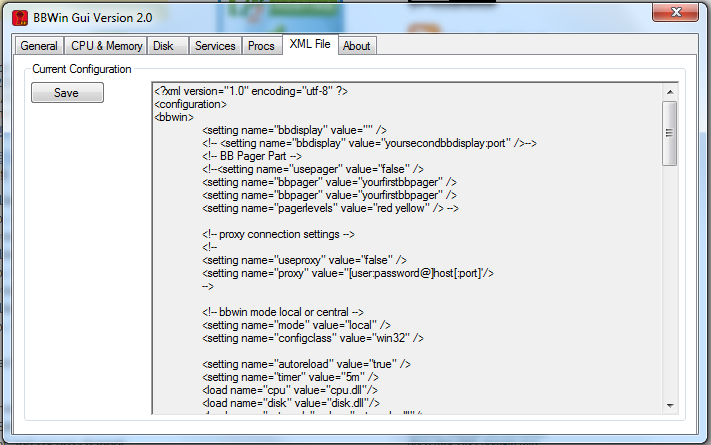
Today we are releasing a brand new fully redesigned BBWin GUI application that will allow the user to quickly and easily add or update the BBWin.cfg file. It is a small standalone application written in C# that provides for most of the configurations that you can find in the BBWin.cfg file. From managing your disks to selecting processes and services to monitor this tool does it all.

When you first launch the GUI it will check to see if it sees the BBWin Service installed on your client and if not will allow you to download it directly from SourceForge.

The next option will be to open an existing cfg file or download our default file.

If you select open existing you will be presented with a Windows Explore window to navigate to the file you want to open. If you select to download the defaults it will pull a generic file from Squidworks.net and start you out with nothing configured. It will auto populate the system name and the default disks, CPU, Memory and Pagefile will be monitored.

The BBWin GUI is uses a multi tab display to configure the different  areas of the BBWin.cfg file. As you navigate across each TAB, different options will be displayed for you to modify as needed. We have incorporated sliders and simple presets areas to make it easier to adjust thresholds without making mistakes to format of the XML file. After making all your changes it is easy to save your file and watch BBWin reload automatically.

DOWNLOAD  Here -> BBWin_Gui_v2.2

Screen Shots


DOWNLOAD  Here -> BBWin_Gui_v2.2

Enjoy

Cubert 😎


Kaseya Agent Procedure -> Check Active Directory for Active User Changes


Agent Procedure “GetActiveADUsers” is a small script I created that grabs the list of all “active” users in all OU’s and pipes that information along with their email addresses to a file. The script then grabs file and stores that file in the GetFile Area inside Kaseya. The script is also setup to alarm on change which will allow you to add a monitor for “getfile” that will email you or do something when the list of users changes.

Makes a great tool when you have large AD environments where there are a lot of OU’s and/or users are  scattered all over the AD infrastructure.  The text file created provides the users full name, email address and dept name if filled out.

Get script here -> Procedure GetActiveADUsers

This is a zip file with the procedure XML file inside. You will need to assign this script to only Active Directory Servers and schedule it for once a day. Then select the Monitor Tab and then Alerts and create a Alarm using the “Get Files” option in the “Select Alert Function ” drop down list. Have it email you if the alarm is struck.

That’s all there is to it!


Enjoy Cubert 😎


[Solved] Appassure Replay snapshots or base image fails to copy from Agent to Core on or after new installs

So you may have a Windows 2003 server or servers that after installing the agents, configuring permissions and setting system to Protect on your core keeps failing to grab the first snapshot from your system.

This is quite common in Windows 2003 but may see it in 2008 as well. The issue is that the Winsock is messed up. Download and run LSPFix.exe on the client system and restart the agent services afterwards. Then go back to the core and select to force new snapshot to start the download. You should see the system start the download with in 5 minutes and no more errors in events.

 I am using Replay version 4.7.2 at the time of this post

Error that may show up when fix is needed:

Logger: tevolib.txtrack
Context: PG=VolsWithInterval60Minutes Volume=\\?\Volume{741d2f02-3eb0-11dd-8e1a-806e6f6e6963}\ DriveLetter=C:
Source Location: TransmissionTracking.cpp:115
Details:
Transmission of volume ‘C:’ started when another transmission of that volume is already in progress

Logger: tevoSource.snapshotHandler
Context: PG=VolsWithInterval60Minutes Volume=\\?\Volume{741d2f02-3eb0-11dd-8e1a-806e6f6e6963}\ DriveLetter=C:
Source Location: SnapshotHandler.cpp:992
Details:
Transfer failed on volume: C: Epoch: 204 Target: CNSCOLO-BDR Port: 8001 – Unspecified error

Logger: exceptions.seh
Context: PG=VolsWithInterval60Minutes
Source Location: exceptions\SehHandler.cpp:151
Details:
Encountered a serious error EXCEPTION_ACCESS_VIOLATION.  Exception dump logged to C:\Documents and Settings\cns\Application Data\AppAssure\ErrorDump-TevoSource.exe-2012-02-28-11-43-41-0625-41.dmp.bz2


Enjoy

Cubert 😎

[Solved] Prevent previous credentials from another session/domain to auto fill when starting a RDP session to a Windows Server 2008 box

Who has not started a RDP session to a Windows 2008 Server or Windows 7 system and had the previous domain credentials popup as the default login for the next system you touch. Well if you are like me and touch many different customers each day then you have no doubt had the login for your Windows 2008 terminal session show the log on of the previous domain that your were logged in to. This can be a big pain in the “arse” if you know what I mean.

Well here is how to fix that problem:

On your own PC go to the registry key

HKEY_CURRENT_USER\Software\Microsoft\Terminal Server Client\Servers\127.0.0.1

Right click and select  permissions on the 127.0.0.1  folder then set permissions to deny yourself read access to it. As soon as you do this, you should start seeing the right domain name when opening a terminal session  to Windows 2008 servers or Windows 7 workstations.


Enjoy

Cubert 😎