XYMON – ESX Hardware Health Monitor

Grab the Hardware Health of your VMware vSphere ESXi Host

Here is RC1 of my ESX Health Script for the XYmon monitoring server, not to be compared to the ESXi script going around for VM and Snapshot Health.  ESXHealth monitors the physical health of the hardware running the ESX hyper-visor  This script uses the xymoncgimsg.cgi to send status reports from a remote network to your XYmon Display Server thus allowing you to monitor ESX Host from anywhere really easily. Using this CGI allows you to run it from any windows box and send the notifications through port (http) friendly firewalls.

The only prereqs are, you must have installed the VMWare vSphere Perl SDK and have installed CURL or place the curl-nossl.exe provided in zip in the your PATH on Windows. Your XYmon server must have the xymoncgimsg.cgi moved from the xymon/server/bin folder to your xymon-cgi folder to allow web based status messages.

I have include the curl-nossl portable EXE with zip. Just drop it in the path for windows so you can call it by name. You will need to edit the script and update the URL to send the notifications to. I show an example in the script on how to use with a htpasswd protecting your web CGI for thoes who use that layer of security. If not then just place the standard URL for your xymoncgimsg.cgi and your good to go.

The script is very simple.

If all is good you get a “All’s OK” else if anything is bad it spits out any relevant info about that issue. The last error I got was for redundant Power lost to Supply 1 and was reported with plenty of detail to know what is wrong.

Just schedule windows to run every 15 minutes or so, see script for command line syntax for task scheduler

Download  -> ESXHealth-1.1  Monitor for XYmon


The monitor will look like the following examples: (Never mind my XYMon theme)


I hope this helps someone out there.

Cubert 😎

New BBWin GUI Version 2 Release for BBWin XYMon Client

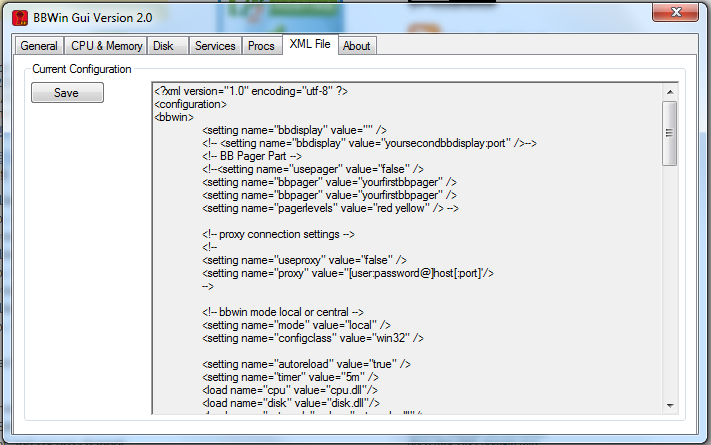
Today we are releasing a brand new fully redesigned BBWin GUI application that will allow the user to quickly and easily add or update the BBWin.cfg file. It is a small standalone application written in C# that provides for most of the configurations that you can find in the BBWin.cfg file. From managing your disks to selecting processes and services to monitor this tool does it all.

When you first launch the GUI it will check to see if it sees the BBWin Service installed on your client and if not will allow you to download it directly from SourceForge.

The next option will be to open an existing cfg file or download our default file.

If you select open existing you will be presented with a Windows Explore window to navigate to the file you want to open. If you select to download the defaults it will pull a generic file from Squidworks.net and start you out with nothing configured. It will auto populate the system name and the default disks, CPU, Memory and Pagefile will be monitored.

The BBWin GUI is uses a multi tab display to configure the different  areas of the BBWin.cfg file. As you navigate across each TAB, different options will be displayed for you to modify as needed. We have incorporated sliders and simple presets areas to make it easier to adjust thresholds without making mistakes to format of the XML file. After making all your changes it is easy to save your file and watch BBWin reload automatically.

DOWNLOAD  Here -> BBWin_Gui_v2.2

Screen Shots


DOWNLOAD  Here -> BBWin_Gui_v2.2

Enjoy

Cubert 😎


XYMON -> New BBWin Client GUI 1.1 Released.

Are you looking for a BBWin Client GUI to configure BBWin.cfg?

Can I see by raise of hand how many of you out there wishes for a good BBWin GUI so you don’t have to edit a that bloody XML file. I am having to flip between Wordpad, Task Manager and the Services console to place in the services and processes I want to monitor on my Windows hosts and that was such a pain.

So out comes BBWin-GUI!

Download file –> BBWin-GUI-1.1


BBWin is an open source client for Windows working with BigBrother or Xymon(Hobbit) monitoring software. We also have a custom VM appliance with XYmon and Cacti pre installed and ready to go. See MAG Server here on Squidworks for more information.

Our new BBWin GUI will read in your current BBWin.cfg file and then allow you to edit it. It provides all the services and processes running on your system and pulls all the unique event logs so  you may choose what to accept and what to ignore. Inside the new BBWin-GUI you will find your local disks and the ability to exclude disks as well as set the thresholds for warnings and panics.  Checkout some of the screen shots below.  Download and try BBWin GUI.


As always I hope this little app helps someone out there.

Enjoy

Cubert

XYMON External Test Script for APC NetBotz Environment Monitor

So you got a APC environment monitor (NetBotz) and you want XYMON / Hobbit / BB to monitor and alert if your tempature is rising? Funny me too.

I spent several hours trying to get a VB script to built to do this and I am just not a big fan of VB. So being a Perl plucker I desided to write one in Perl and share it with

So you got a APC environment monitor (NetBotz) and you want XYMON / Hobbit / BB to monitor and alert if your tempature is rising? Funny me too.

I spent several hours trying to get a VB script to built to do this and I am just not a big fan of VB. So being a Perl plucker I desided to write one in Perl and share it with everyone.   

Here is what it does:

The script  queries via SNMP the OID for the tempature sensors current state and then create a XYMON file and place it in the tmp folder where XYmon(BBWin) resides  so that the XYMON(BBWin) service can pick it up and transmit the information to the BBDisplay.

Prereqs are: Windows host, BBWin, ActiveState Perl 5 installed on windows, snmpget.exe application located at http://www.snmpsoft.com/freetools/snmpget.html
Place SNMPGET.EXE in an area that is seen by Windows PATH.

Add to BBWin.cfg under the <Externals> area of XML:

<load value=”C:\Perl\bin\perl.exe netbotz.pl” timer=”5m” />

and copy this script to the BBWin/Bin directory. Every 5 minutes you should see a “NetBotz” file created in BBWin/tmp and shortly afterwards BBwin will remove file once data is sent. On your BBDisplay you should get a new column called [NetBotz] and when you select the “Dot” it will display the current temp.

You may need to play with the OID # for your install of Netbotz as mine had 8 ports (OID’s) for tempature monitors but we only used 1 port so I am only monitoring that OID.

OID’s are

1.3.6.1.4.1.318.1.1.10.4.2.3.1.5.0.1

through

1.3.6.1.4.1.318.1.1.10.4.2.3.1.5.0.14

So adjust the last digits (1-14) for your sensor location on Netbotz.

Download -> Netbotz Perl script

Enjoy Shannon, aka Cubert

BBWIN VB script for MySQL externals testing

Use BBWin to Monitor Your MySql Server
This little script allows you to quickly test your MySql server using BBWin .

It connects to MySql and queries SHOW STATUS from your server and returns the Stats.

[caption id="attachment_286" align="alignright" width="80" caption="www.AlertOnFailure.com"][/caption]

The script will alert if connection fails or records not returned.

You will need

Use BBWin to Monitor Your MySql Server
This little script allows you to quickly test your MySql server using BBWin .

It connects to MySql and queries SHOW STATUS from your server and returns the Stats.

www.AlertOnFailure.com

The script will alert if connection fails or records not returned.

You will need to install mysql-connector-odbc-5.1.6-win32.msi From [url]dev.mysql.com/downloads/connector/odbc/5.1.html[/url]

You will also need to edit the script and change the server address, database name, user and password.

:arrow: Download file to BBwin\bin folder

MySQL.vbs
Grabs Global stats from MySql server any where on your network
(2.98 KiB) Not downloaded yet
You will need to edit the BBWin\etc\BBWin.cfg file and insert the line below


<load value="cscript MySQL.vbs" timer="15m" />

You will not need to reload BBwin. It should pickup the changes to the file and load the test. With in a minute or 2 you should have a new system “Dot” called “MySQL”

More VBScript created for BBWin External testing for www.AlertOnFailure.com

AOF adds VBScript created for BBWin External testing to it’s library

[ipconfig]

Microsoft Networking Information Overload
What a name! The MOAB of network information this jewel of a script dumps out all sorts of good information to have at your finger tips.

In this version there is only one status of green so you

AOF adds VBScript created for BBWin External testing to it’s library

[ipconfig]

Microsoft Networking Information Overload
What a name! The MOAB of network information this jewel of a script dumps out all sorts of good information to have at your finger tips.

In this version there is only one status of green so you can’t place a notification on this test but it does provide some really good data to have at your finger tips.

It provides:

All IP, Wins and DNS information
The System name, domain name and current logged in user
All Network Login Profiles
Dump of your routing table
All Network Clients Installed
Host Proxy Server Information
All Network Adapter Configuration Properties

[defrag]

defrag checks each fixed drive on the host and reports back a status of yellow if any drive needs defraging.

Else if all drives report no defrag needed the status is green.

The report shows up as a “System Dot” called “defrag” and you can assign alert notifications to this test. Currently the test only reports a status of yellow or green. there is no red status in this test.

[PWRmgt]

PWRmgt confirms the current power management setting and any power supply alarms and reports the information back to the AOF server.

This does include status changes, Green, Yellow and Red based on the nature of the issues.

This test creates a “System DOT” called “PWRmgt” on the AOF display and can be used to set alert notifications to.

Get Scripts Here

New VBScript created for BBWin External testing for www.AlertOnFailure.com

I’ve created 2 new VB scripts to use with AOF and BBWin’s External test functions. These scripts were tested on BBwin 0.12 and AOF Beta and work great!

[RePing] Ping multiple internal host addresses

Provides the ability to ping multiple host behind a firewall or other device, Great is you need to test to see if a Wireless AP is up or if a network printer is

I’ve created 2 new VB scripts to use with AOF and BBWin’s External test functions. These scripts were tested on BBwin 0.12 and AOF Beta and work great!

[RePing] Ping multiple internal host addresses

Provides the ability to ping multiple host behind a firewall or other device, Great is you need to test to see if a Wireless AP is up or if a network printer is available. There are many systems that do not run a agent that you can ping to see if they are up and running. This all gets reported back to the AOF servers and placed as a “System Dot” called “RePing”. If a host fails to will change status. You can use this to get remote notifications of failures by placing a alert notification rule to the test.

See Script file

[Wares] List All Installed Software on AOF server (BBDisplay)

Wares.vbs is a visual basics script used to upload a list of installed software on a windows host.  In version one we are sending just the data, no status changes are happening. Version 2 will have the ability to alert if apps are added or removed.

See VB Script

These were developed to be used with www.alertonfailures.com  free system monitoring and management services but the scripts will work just fine with any XYmon server or BBDisplay server.

AOF Web commercial

Squidworks completes first stab at a Web commercial for Alert On Failure

AOF provides free network and computer system monitoring.

http://www.youtube.com/watch?v=H7PGgxRqvDo

Squidworks completes first stab at a Web commercial for Alert On Failure

AOF provides free network and computer system monitoring.

Squidworks completes 2 AOF Training Videos

The Squidworks team has completed 2 system training videos for the AOF website. These video are posted under Youtube and are available to everyone. All sound and video editing done by our Engineers.

Alert On Failure Free System Monitors

AOF : a Xymon \ BBwin Compatible monitoring service.

http://www.youtube.com/watch?v=aQHSnZPPTEY

Previous Videos

AOF: First Login Overview
http://www.youtube.com/watch?v=Yg6oxSZV8gE

The Squidworks team has completed 2 system training videos for the AOF website. These video are posted under Youtube and are available to everyone. All sound and video editing done by our Engineers.

Alert On Failure Free System Monitors

AOF : a Xymon \ BBwin Compatible monitoring service.

Previous Videos

AOF: First Login Overview

AlertOnFailure Launches to Alpha

Alertonfailure is offering free 1 year memberships to admins who would like to help Alpha test the services and report back to the forums in detail any issues they find as they use service.

Alert On Failure free System Monitor

Just sign up for both a free user account and forum account and send

Alertonfailure is offering free 1 year memberships to admins who would like to help Alpha test the services and report back to the forums in detail any issues they find as they use service.

Alert On Failure free System Monitor

Just sign up for both a free user account and forum account and send that to support at alertonfailure. They will send an email back when they update your account to premium.