Patch Remedy Pushes WUA Version 7.6.7601.23775 to Windows 7 and 2008 R2

Today Plugins4Automate released Build 1.0.3.62 for Patch Remedy for ConnectWise Automate / LabTech. In this new build they have re worked how they update the Windows 7 and 2008 R2 systems making it more streamline as they raise the level of WUA version between each rollup Microsoft has released.

To read more of what’s new with Patch Remedy and how it can help prevent worms like WannaCry visit the latest blog post on Patch Remedy here

WannaCry stopped in it’s tracks with the help of Patch Remedy for Connectwise Automate

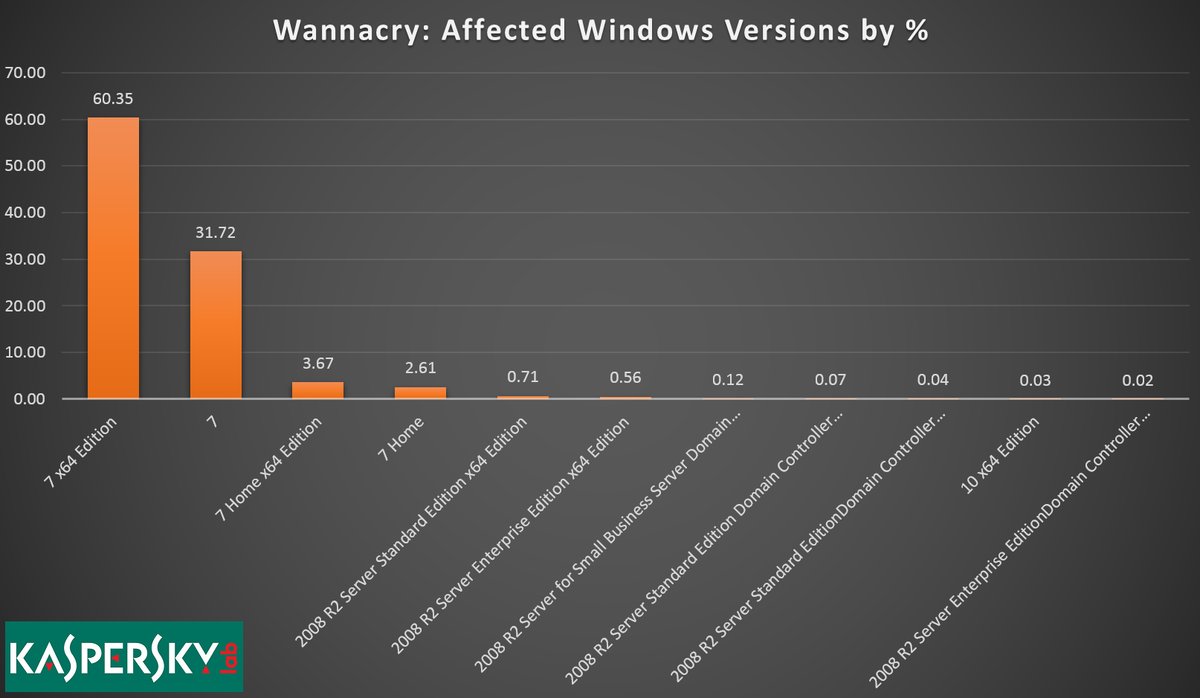
WannaCry exploits windows 7


Patch Remedy stops WannaCry from exploiting Windows7

Plugins4Automate has developed a plugin for LabTech / Connectwise automate that helps with keeping Microsoft products updated with the latest WUA versions. This assistance provided to Labtech allows for more consistent update deployments across all Windows OS types. This proactive approach to patch management helps MSPs prevent such outbreaks like the WannaCry work that hit this last week.

Patch Remedy posted this week how they help prevent breakouts across the MSPs using the Patch Remedy product to keep their Windows systems fully patched.

For more information on how Patch Remedy can resolve your Labtech and Connectwise Automate patching issues please visit Patch Remedy at Plugins4Automate.com

P4A post April newsletter highlighting their latest plugins


Today, Plugins4Labtech released their April newsletter where the talk about some of the latests plugin update they have been working on.  They have made several updates lately to Patch Remedy, Chocolatey and Surflog. Some of these updates add new features while others fix issues being reported by the MSP’s using the plugins.

There are announcements of new plugins they are working on and also the Plugin of the Month. If you use LabTech or Connectwise Automate then you should visit https://www.plugins4labtech.com/blogs/blog/connectwise-automate-plugin-highlights-for-april-2017


Office365 for Labtech Plugin special offer for MSPs

Access Office 365 for all your clients in a single pane of glass from inside LabTech in just a click with the all new Office 365 For LabTech plugin from the guys over at Plugins4Labtech (P4L). We here at P4L want to give all MSPs a chance to experience how having Office 365 at the techs’ fingertips can save time and money so we are offering 50% the life of the subscription if purchased in February. Just use the PROMO code TRYOFFICE365 at the checkout at plugins4labtech.com. You will receive 50% off your monthly subscription. The catch? We want your feedback. What do you like and what do you not like? After you take it for a spin, send your feedback to support@plugins4labtech.com.


What an incentive to come try a tool that puts control into the hands of the helpdesk!

Take me to the plugin

VMWare ESX Hardware Health monitor for Labtech

headerlogo


Plugins4LabTech has created a new plugin that will monitor the CIM data announced by the hardware running VMWare ESX software. We can report on any hardware that follows CIM standards and makes it’s hardware statuses known to VMWare. This simple to use plugin deploys in just minutes and can be setup by anyone with little or no  knowledge of LabTech functions and processes. If you want to see in action the easiest ESX Hardware Health Monitor available for LabTech then have a peek at our video on our YouTube Channel.


Never be in the dark again over hardware health!


Get alerts and tickets when hardware failures are detected. Using the monitor agent supplied with the plugin get quick responses to failures and warnings directly from VMWare. When alarms happen get emails, tickets and messaging alerting you to the failure that is taking place on the hardware.

Plugins4LabTech’s VMWare Health Monitor plugin for Labtech uses an agent to talk to VMware ESX hosts and retrieves the CIM data for the hardware the ESX host is running on. The plugin processes this data and stores it in LabTech’s database to be used in the views and alarms the plugin issues when failures are seen. You will see data on your RAID arrays and SCSI controllers, Power Supplies failures and system overheats. If the hardware is reporting it to VMWare we can see it.


Main ESX Health Monitor Console

The main view lets you see all the ESX hosts under management sorted by Client. In this view you are able to turn on and off the collection of data, set the interval of how often the data is collected and enable alerting for any seen failures.

ViewMenu


ESX Health Monitor Client Console Tab

The Client Console tab is where you would add and delete the ESX Hosts you want to monitor. You are able to force the update of ESX CIM data by selecting to rescan ESX hosts and you can view the full CIM data list of any ESX Host.

Clienttab


ESX Health Monitor CIM Data

The CIM Data view shows all the collected CIM data on a given ESX host. If any data is in a state not considered ok then those lines will be represented with warning and alarming icons. You will also get the hardware manufactures data back and in the case of Dell that is the Hardware type and Service Tag.

CIMData


ESX Health Monitor Internal Agent

Under the main view you can select to enable alerts. When you do this agent is created in the internal monitors of LabTech. You can use this monitor to email, ticket, alert or message anyone when failures are picked up.

monitor

A simple plugin all self contained and easy to deploy.  Just a few clicks to configure and you have data. So easy to use anyone can setup and have it working in just a few minutes.


The plugin is currently with the Squid Squad getting a final review before we release the new plugin. Follow our release notes at http://support.plugins4labtech.com

download


CCleaner for Labtech As A Security Tool

linkedin-post-header

The recent announcement that LabTech Software is managing the the sale of CCleaner for Business licensing and  providing free of charge the popular CCleaner for LabTech plugin developed by the Plugins4LabTech team is huge for the LabTech community. Every MSP knows the benefits of using CCleaner to maintain disk space and reduce junk on client PCs but most are unaware of the amazing security tool they have as well.


CCleaner a security tool? Absolutely, CCleaner is a great security tool to assist in maintaining password policies across the client and reducing the exposed footprint of the end users. Just have a look at another plugin provided freely by Plugins4LabTech called PassPort. This plugin scans the MSP’s client base for saved password and account info. It pulls this data directly out of the local windows PCs across the MSPs clients and brings all that data back to LabTech. This tool represents just how easy it is to get to this data and if you can get it, anyone can get it. CCleaner for Labtech can help prevent this data from reaching the wrong hands.


CCleaner for LabTech does this by automating the cleaning process across the entire MSP.  By forcing a daily cleaning of all Browser Cache, Saved Passwords and Cookies will reduce the attack surface of each PC and trains the users to be more security minded by prevent them from getting value from saving passwords and allowing tracking and monitoring cookies to follow user’s browsing history.

For pennies a month a MSP can plugin to this powerful tool and really provide a value to their clients while helping to keep them safe! For more information on how to get CCleaner for LabTech please reach out to your LabTech Sales team. They will be glad to assist you and get you going with this great tool.


Also check out http://www.plugins4labtech.com for a complete list of free plugins for LabTech Software.

Office365 for LabTech Pre-Release Feature Overview

0365Plugins4LabTech is about to release to the community it’s next generation of Office365 Management for LabTech


Plugins4LabTech has completely rewritten this plugin from the ground up. No longer are your required to go through a set of manual installs and system prep to use the plugin. No longer is your workstation tied to processing Office365 commands. No longer do you have to deploy MSOL scanners at every location that uses Office365.  No longer do you have to have a client systems collecting Office365 data. So say goodbye to all that luggage and say hello to the new and improved Office365 for Labtech.

Let’s go over some of the new innovations we have coming with this new plugin. Our biggest change comes in the form of a single pane of glass. We have moved all views into one master manager so you can flip from client to client without ever leaving the windows console you are in. This centralization does not stop at the user’s view but continues to the data collection and control systems. You now assign a single system anywhere across your MSP to manage Office365 for all your techs and clients. You can control what is collected and at anytime you can start a manual collection of data through the plugins control center.


The Control Center

Configure


The Control Center allows you to deploy all the MSOL modules you need to manage Office365 to your master scanner. If you find that you would like to use the Console Shell feature on your local workstation as well then you can select from the list of systems, your workstation PC and “Deploy MSOL Modules” to your workstation quickly. You can execute manual scans of all clients MSOL data, MSOL Statuses and more from this convenient window.  Verify when the last scans took place to know if your data is up to date and how many clients were scanned. We also monitor and display if your scanner is online and available and if we see it up to date with it’s MSOL modules. All this is done automatically when you install and add your clients. LabTech will execute scanner twice every 24 hours to keep all data up to date with the clients real world data so as to capture changes made from AAD Connect if active for clients.


Your Single Pane Of Glass

Main-Azure


The Office365 for LabTech console is pretty strait forward, At the top you have your active Office365 client list to select any client configured for Office365. From this view you get to manage the clients Azure, Exchange, Groups, Sharepoint sites and licensing usage along with the most recent MSOL hosting statuses for each client. Once a client is selected then their list of users becomes available for selection. By selecting a user from the list each tab will reflect that users information where relevant allowing you to manage many aspects of the user’s experience. In Azure you can manage new users, user passwords, unblocking a locked out user, setting strong password requirements and enabling and disabling many other features in Azure.


Azure Groups

Main-AzureGroups

Quickly manage new groups and removing old groups and Add and remove users from groups without ever leaving LabTech.


Exchange Management

Main-Exchange


Easily Convert user mailboxes to shared mailboxes saving your client license usage when archiving expired employees. Setting mailbox permissions quickly like Grant Send on behalf of, read only or full access to mailboxes for any user is a snap with Office365 for LabTech. Set forwarding addresses and manage a users Out Of Office messages and activity all right inside this single pane of glass.


Manage Sharepoint

Main-Sharepoint


Add and remove sites  from Sharepoint. Manage Sharepoint groups and members site access.


MSOL License Management

Main-Licensing

Get access to all the license information for your clients, see what service plans exist for each license the client holds and the usage of each license. Add and remove licenses for users quickly without ever leaving your LabTech console.


MSOL Status

Main-MSOLStatus


MSOL statuses keep you informed as to the state of the hosted services Microsoft is providing to your clients. Each client can have different status messages based on location of hosted services and the systems and services affected. These status messages are extensive and provide detailed information from Microsoft on the issues and resolutions completed.


The All Powerful MSOL Shell

MSOLShell

Our Holy Grail, The MSOL Powershell console, Launched from Office365 For Labtech’s single pane of glass, has also been rewritten from the ground up to include module loading management, new commandlets and a clean look. If you are one for shells then this makes it easy to launch a Powershell console for access to any clients data directly from your workstations (no login information required). Run commands and scripts directly from the shell accessing all the MSOL services the client is entitled to as the tenant admin.


Our plugin has a little something for everyone, Stats and metrics for the senior staff, High level control over clients settings and global data for you engineers and access to common tech functions like password updates and removing lockouts making Office365 for LabTech a must have tool in your Labtech Tool Belts. We are not stopping there, Plugins4Labtech development team is continuously adding new features and functions to this plugin allowing the plugin to grow as MSOL services change and develop.


Office365 for Labtech will be released to the general community on Monday, June 20th for the opening of Automation Nation. If you are going to be at Automation Nation come seek me out if you would like more information on this release.

Visit Plugins4LabTech.com for more information and downloads. Would you like to see a Demo of Office365 being used in LabTech?

apple-icon-114x114


Backup Windows for LabTech gets new Offsite Synchronization features

linkin-plug


The Plugin4LabTech development team has let it leak out that the next version of the Backup Windows for LabTech plugin will now include Offsite Synchronization as a standard feature in all new versions. This feature allows MSPs to Offsite the local backups with schedulable Sync times keeping mirrors of the local backup directory on storage services across the internet.

Developers at P4L went on to comment that all transmissions over the internet of backup files were encrypted and secure point to point. With all the security issues abound you shouldn’t have to worry about someone scarfing up you backups.  Shannon (a.k.a Cubert) said “We are not trying to reinvent the wheel here, we are using proven technology by long standing venders. So it just works.

Plugins4LabTech has now made it so that no MSP has an excuse not to have good quality backups as part of their offerings. No longer do you need to force consumers into expensive backup services to ensure a quality backup is maintained for your clients. You can also be assured that backup are safe offsite in event of a disaster event.

Virtualize Anywhere, Backups are created using Microsoft Virtual Disk format so all backups files are VHDX files that when mounted can become a Virtual Machine or be mounted as a hard drive. This makes it a great tool for disaster recovery, mount and recover just about anywhere using the tools you have within your Windows system. No special recover tools to download and maintain which is great when the fires are raging.

Automatic backup archive usage management means you will never run out of disk space on your target backup disk making backups worry free!
After you configure a disk for a scheduled backup, Windows Server Backup automatically manages the disk usage—you do not need to be concerned about running out of disk space after repeated backups. Windows Server Backup will automatically reuse the space occupied by older backups when creating new backups. The management tool displays the backups that are available as well as the disk usage information. This can help you plan for provisioning additional storage to meet your recovery objective.


To get more information on this plugin and all the other plugins Plugins4LabTech offers please visit Plugins4LabTech.com


Squidworks launched Plugins 4 LabTech web services portal

Plugins4Labtech_making-managed


A new one-stop-shop for LabTech plugins has arrived with the latest launch of plugins4Labtech.com, developed by Squidworks. The new user-friendly shop offers both free and paid plugin tools for the most popular remote monitoring and management (RMM) tool in the market place. It’s specifically designed for IT managed service providers (MSPs) and offers powerful tools all in one place.


The new plugins4Labtech.com site features some of the more popular premium plugins like Chocolatey for LabTech, CCleaner for LabTech, Patch Remedy and a new plugin released today—Backup Windows. It also features free plugins developed and honed quickly to meet the growing needs of IT professionals and MSPs like Office365 Manager, Agent Status, Flu Shot and PowerShell. What’s more is that the plugins are created by an experienced systems engineer with 20 years in managed services and a multi-system developer, Squidworks (a.k.a. Cubert), and tested by a user group made up of MSP engineers affectionately called the Squid Squad.


The site offers links for support as well, including helpful support forums where users contribute to the development of new plugins like the one hosted on plugins4LabTech.com.


For more information on the site or to find and provide feedback on the latest tools to help you with LabTech, visit the online forum at plugins4LabTech.com.

Application Delivery – The challenges a MSP faces as they expand service offerings to keep up with changing markets

Challenges With Application Delivery

The MSP marketplace has exploded over the last 15 years and with that growth comes a more diverse marketplace and greater offerings to help attract clients. The need to provide even more services that have a real impact to the client has been at the forefront of this boom and drives the market for improving themselves over the simple “Geek Squad” mentality of let me fix your PC. The rapid pace of technological developments in the MSP space has introduced wrinkles to this paradigm that has left many businesses shackled to old methods of application delivery even as new means of application delivery offer a path forward.

shannon2

Shannon Anderson, Sr. Systems Engineer and Application Developer with MainSpring Inc. has over 20 years of experience working with and managing MSPs. Shannon is an advocate for automation.  His vast knowledge of services provided by the MSP market makes him uniquely qualified to discuss the Pros and Cons of Application Delivery; what is evolved; whom the players are and how to come out on top with proven methods.


Application Delivery, What’s That?

Application Delivery is the ability to provide and push any software title to any end system using automation. When you start asking questions about Application Delivery, you will get a lot of different answers on what that entails. Many people tend to associate it with Application Maintenance which is not accurate. The key differences are being able to provide software to your clients when and where they need it.   Maintenance presumes that you have some key software that needs to be maintained. Application Delivery is being able to provide  software that can be pushed out to the MSP’s clients through automation and policies.

There are several services available to MSPs that allow them to provide application maintenance to their end customers.  These product provide access to a limited number of common software titles and are geared towards providing updates automatically for those software titles as a service. They are not really designed to deploy applications, but, to maintain a select set of them after deployments. Application Delivery is designed to deliver and maintain unlimited software titles to the end system through automation and policy. This process allows MSPs a more granular approach to how they expose their clients to deployment of technology and how to maintain consistency across a client and the MSP as a whole.


What’s Involved?

Application Delivery is a bit more involved than Application Maintenance and is one factor that separates the inexperienced MSP from the veteran MSP.  Application Delivery requires a lot more involvement from the engineering side of the MSP but in return adds diversity and manageability to the MSP’s offerings.  Unlike application maintenance where a vendor pre-qualifies a few updates, Application Delivery needs to account for thousands of applications and their updates which is a much larger responsibility to own.


What are the Pro’s and Con’s

This is arguably the most queried subject with Application Delivery in a MSP environment.   What does it do for me?  What is the catch? Application Delivery should not be taken lightly. There is a lot of work to do to make sure things run smoothly and that your clients get the best use of the services you offer. To deliver application efficiently today you need a deployment framework that allows for the hosting; security;  versioning and deployment of a large amount of applications. There are several frameworks being developed or used to provide this functionality to end systems. In the Unix world you have frameworks like Yum or Apt-get.  Likewise,  in the Windows world you have NuGet and Chocolatey.

Lets talk about some of the Con’s

Unlike with Application Maintenance where the vendor provides a vetted set of software application to update like Java, Flash and Adobe Reader, Application Delivery can provide any software you want to create packages for. This at first, would look like it should be part of the Pro’s list ,and it is, but it is also a Con for a lot of MSPs. By being able to provide unlimited software titles and unlimited version updates means there is less likely that a package has been vetted. This can bring up security concerns when delivering 3rd party software to your end client. If you use the public software repositories as your main distribution point then vetting the software and the providers is key in maintaining security over the software you install. Not doing so would invite elements into you managed networks that are undesirable. This means that you must do your homework; identify the resources that provide valid products; pre stage deployments and verify integrity.

The Pro’s on Application Delivery

When done right, the Pro’s are many indeed.  The one that stands out most to me is being able to control the deployment of approved applications consistently across our MSP. The selections of software titles can be vast depending on the repositories you use.  Chocolatey boasts that over 2500 applications and updates are hosted on the public repositories which dwarfs and maintenance vendors repositories. The delivery of applications are not just limited to freeware software.  Repositories often offer 3rd party paid software deployments and updates making the deployment of new hardware very easy and consistent with deployment policies. Another really great Pro in my opinion is the ability to host your own repositories providing another layer of security to your delivery processes. When building and creating your own deployment packages you have ultimate control over the software and the options enabled inside the package. Another Pro is that you are not limited by the software vendors available. Install software from Microsoft;Adobe; Apple; Google; Piriform; Kaspersky and Oracle to name just a few.


Who are the players?

When it comes to Application Delivery there are just a few names out there. More are available for the Application Maintenance market place. We named a few of the frameworks available to use for Application delivery as doing a search on Google may not produce much to help the average MSP. Both Kaseya and LabTech are offering to the MSPs that use their platforms a set of functions to maintain some applications.   You have 3rd party products like Ninite. Then there is Squidwork’s Chocolatey For LabTech which harnesses the Chocolatey framework to provide true Application Delivery.


Come Out On Top!

MSPs that succeed have one thing in common, that is they continue to push the edge of product service offerings expanding the level of service provided to their clients. Application Delivery is one way a MSP can make its mark on it customers and delivery exceptional services which will help retain and grow their business.