MAGMA – Web GUI Admin Add-on for XYmon Monitoring Server

MAGMA is a Web GUI interface for managing hosts, groups, tests and alarms on a XYmon server.

If you ever used XYmon you know that most of it is configured and managed by text files on the server. If your are not skilled in VI or Nano then this may present somewhat of a challenge at times.  Well all that is over when you install MAGMA as an add-on to your XYmon server, MAGMA frees you from the text files.


MAGMA is designed in PHP and uses a MySQL server database to store all the host, test and alarm information and creates your text files for you. MAGMA also integrates directly in to your current themes with out the need to edit or change the page code. You extract our tarball to a temp directory and follow the simple readme instructions to quickly get up and running.  Whether you use Local mode or Central mode you can manage your hosts using MAGMA. In Central Mode you have full control over the host system, you can manage all tests, thresholds and alarms notifications and if you prefer Local Mode you can manage the host and any external tests and thresholds and all alarm notifications.

MAGMA Manages:

  1. Page groupings
  2. Host in groups
  3. External tests (HTTP, SMTP, SSH etc..)
  4. Internal tests (CPU, LOAD, DISKS LOGS etc…)
  5. Drop tomestoned tests
  6. Manage all notifications of alarms

Download MAGMA ver. 0.01a

Screen Shots of MAGMA on XYMon

Look for New Menu in XYmon
Group manager for XYmon
Manage XYmon hosts
Edit Host Tests
Manage Alarms


New website development – www.hogtrek.com – Where to go when you want to ride!

The place to go when you want to ride motorcycles


Squidworks.net starts development on a National Harley Davidson Riders Community.

Whether it’s a joyride or a long haul, cruising the U.S Highways on a Hog is an activity that only a few get to do in their lifetime. The friends and family you make on the trails are like no other.  Hogtrek.com brings groups of biker together to promote the brotherhood that is created when you bring two bikes together.

 Hogtrek.com is a free membership based web community that caters to the Harley Davidson Motorcycle Rider. The website provides access to a large database of Harley dealerships, motorcycle riding clubs and parts and paints from across the United States. The Harley Davidson owners one stop shop for fun, maintenance, performance  and biker bling. With community and group forums, motorcycle club group hosting and part and paint venders.  You have only one place to go to get all you need for the ride ahead. We sponsor motorcycle ride routes in our monthly riders choice cycle routes. See our selection of motorcycle routes and ride maps, members can upload new Google Map routes to be previewed by the community or browse the library of motorcycle routes uploaded from our membership. The next time you need a motorcycle route for you club to ride come to Hogtrek.com.

Come check out the “whats going on’s” at Hogtrek.com


Free Digium SwitchVox ConnectWise Switchboard Widget aka (ConnectWise Callers)

From the skunk works here at Squidworks.net comes the ConnectWise Callers widget for the Digium SwitchVox PBX switchboard.  The ConnectWise Callers Widget queries your Connectwise database for information about inbound callers calling in to your SwitchVox PBX. When a phone number is picked up from the caller ID it is then used to query the contact and company tables inside Connectwise. If it finds a match then it queries for key information about the caller including what company they are associated with and any personal information kept in the contact database.


The widget collects:

  1. Callers full name
  2. Callers Title
  3. Company Name
  4. Nick Name
  5. Married Flag
  6. Spouse’s Name
  7. Children Flag
  8. Children Info
  9. Anniversary Date
  10. Hobbies

Of course this all relies on your database being complete and accurate, ConnectWise provides the table and the ability to add and edit this information within your company contacts area. Using this widget to query this information as fast as you can pick up the phone allows you to be heads up on your caller, making calls more personal and closing sales.  The best part is it’s free!

Download ConnectWiseCallers here –> Connectwise-Callers-switchboard

The download zip file contains a single php file and 2 images. Extract all files to the same directory inside a web server that is accessible from your SwitchVox PBX .  Your web server can be Windows or Linux but must be able to use (mssql_connect) to access Microsoft SQL servers (ConnectWise Database). If you are using Linux and need some help getting MSSQL working with Apache and PHP then see my how-to post https://squidworks.net/2011/07/how-to-setup-ubuntu-and-php-to-use-mssql-microsoft-sql-server/  and you should be up and running within minutes. You will need to edit the ConnectwiseCallers.php file between line 48 and 52. Edit the following lines to reflect your ConnectWise Database and user access to database.

//Connectwise Database access
$cwuser = “ConnectwiseUser”;             <— Your Connectwise SQL User
$cwpass = “ConnectWisePass”;             <— Your SQL Password
$cwdb = “cwwebapp_companyDB”;   <— Your Connectwise Database name
$cwserver = “cw.yourdomain.com”;  <— Your SQL server address

You will need to log into the SwitchVox Admin area and add the Custom panel. Goto the Tools menu and select Switchboard Panels, You should see the following:

Select the Custom Switchboard Panels tab from the admin and then select Create Custom Panel button.


  1. Panel Name = ConnectWise Callers
  2. Panel Description = Queries inbound callers for Connectwise information
  3. Panel URL = http://yourWebServerAddress/switchboard/ConnectwiseCallers.php?NAME=%CALLER_ID_NAME%&NUMBER=%CALLER_ID_NUMBER%&EXT=%EXTENSION%&LOAD=%FIRST_LOAD%
  4. Select the extensions you want to allow access to widget


Save Custom panel and launch your Switchboard, once the switchboard loads select your new panel from the add panel menu. You should get a ConnectWise Callers Image in you panel if it is accessible and your URL is correctly addressed. The panel should start out looking like this:


This is version 1 of the widget, we will be looking at expanding the widget in the next versions to allow you to edit the information so you can update you customers contacts on the fly. If you have ideas on data or features you would like to see in the next versions of the widget feel free to post your comments here and we will see if we can add them into the widget.

Enjoy

Cubert 😎

WiFi Pineapple? More like a WiFi Grenade!

WiFi Pineapple discovery!


I came across this little jewel at a Kaseya  Connect conference in Vegas in 2012, as a victim of this little  bastard with my IPad ID up on display for all to see at the conference. I was intrigued . Yes Cubert logged on to a Kaseya Conference Free Wifi the day before and the IPad remembered the network and along comes this security guru guy, plays a little trick on the unsuspecting convention goers by dropping a Jasager WiFi Pineapple “Grenade” (Pineapple + Karma + DNS Spoof + SSLStrip + URL Snarf)  in the middle of the conference main gallery. So there I am checking my mail and Ebay’ing for a newly used Harley RoadKing when it got really slow and the  connection, all of a sudden seemed  like the wifi signal started to suck. I poped open the available networks and found that I was connecting to the Kaseya SID but right beside it was the real SID the guru was using to acces his WiFi Pineapple but the Pineapple would answer for any SID you had ever connected to.

 Cubert – “I’ve coined the phrase Pineapple Grenade, You take this this little bastard and lob it into the middle of a pubic room like a grenade and the results can be deadly! Facebook will never be the same.” 

Holy Shit!!


Next thing I know I am one of many Vegas conference junkies that was on display for all to see. I will tell you I was bummed… I consider myself a…  well an above average computer guy. Linux is an old friend, and I have worked  on the platform for almost 2 decades. I remember building for fun over a weekend LFS (Linux from Scratch) when it was in it 1.0 series several times because my programming buddy at college kept formatting my build drive .  The makeup of the Pineapple Mark IV is not foreign  to me at all, I was so intrigued that I looked up Hak5 and ordered one as soon as I got home from the conference as many I bet did.. $89.00 dollars plus shipping of $6.00 for a total of $92 dollars gets me a nice prebuilt compact wireless linux box with tools to play man in the middle to any public wireless service any where? What a Deal!


Delivery Day!


So I crack open my package I received from Hak5 and there it was, my very own WiFiPineapple. Well I could not wait to jump in and start playing with all the neat things this little bastard could do. I read over the little pamphlet that came with it. It gave you the basic low down on what this this WIFi Pineapple does and a very simple explanation of how it works. That is pretty good, as a basic Windows Geek will have issues understanding a lot of the routing and backend modifications this basic OpenWRT linux wireless unit will require to make use of the product. With a nice little interface and several tools, the expectations that you have the knowledge to take it to the next level is required.


Warning, Be Smart!


So feel safe some what in he fact that not every kid with a PC has one but “before warned” it is out there and you will need to be mindful that there is no wireless AP that is safe or secure as a  connection to the Internet. Never do any banking or other secure service over a free WiFi!! You have been warned! SSL is not secure and is meaningless to a device like this. They will own you if you are not paying attention.  Be smart people!


For more information on the WIFI Pineapple Mark IV goto WiFi PineApple


I will be writing up my experiences and sharing the knowledge on how this works and what it can do so watch for my posts on the WiFi Pineapple Mark IV.


Until then,

Hola

Cubert  8-).


New BBWin GUI Version 2 Release for BBWin XYMon Client

Today we are releasing a brand new fully redesigned BBWin GUI application that will allow the user to quickly and easily add or update the BBWin.cfg file. It is a small standalone application written in C# that provides for most of the configurations that you can find in the BBWin.cfg file. From managing your disks to selecting processes and services to monitor this tool does it all.

When you first launch the GUI it will check to see if it sees the BBWin Service installed on your client and if not will allow you to download it directly from SourceForge.

The next option will be to open an existing cfg file or download our default file.

If you select open existing you will be presented with a Windows Explore window to navigate to the file you want to open. If you select to download the defaults it will pull a generic file from Squidworks.net and start you out with nothing configured. It will auto populate the system name and the default disks, CPU, Memory and Pagefile will be monitored.

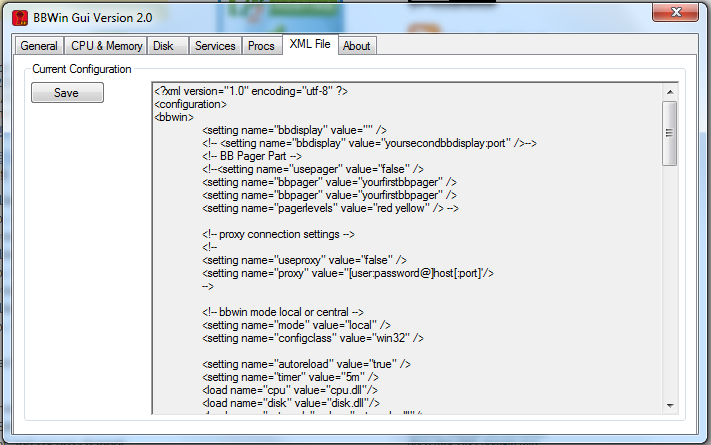
The BBWin GUI is uses a multi tab display to configure the different  areas of the BBWin.cfg file. As you navigate across each TAB, different options will be displayed for you to modify as needed. We have incorporated sliders and simple presets areas to make it easier to adjust thresholds without making mistakes to format of the XML file. After making all your changes it is easy to save your file and watch BBWin reload automatically.

DOWNLOAD  Here -> BBWin_Gui_v2.2

Screen Shots


DOWNLOAD  Here -> BBWin_Gui_v2.2

Enjoy

Cubert 😎


[Kaseya Agent Procedure] – Run CHKDSK And Repair If Needed.

Free Kaseya Script – Run CHKDSK And Repair

Here is another free script from Cubert’s Dwelling, An Agent procedure that will run a CHKDSK in read only mode. Parse the output and run a chkdsk /F if it meets the criteria set forth in the script. It then emails an alert with the scan results to a email address provided before it uploads a copy of the scan to the get file for storage and review. Finally it updates 2 custom fields in the system info table with a brief result and the last run time. If it finds the disk healthy it will report as such if not it will report one of several error types.

Download Script Here

You will need to unzip the script and import it into Kaseya. Once imported edit the script and find the 2 places it email out and update the email address(es), Then you will need to add the 2 custom fields into your System-info table.

To add the custom fields:
1#  Open Kaseya and go to [Audit] – [View Individual Data] – [System Information] and select the button marked [New Custom Field]

2# The next box that pops up will create a new field, We will need to add 2 fields the first is CheckDisk Status and it will be a type String and Check Disk Updated with a type String.

Now run your disk check and see what it shows. If it meets with the right disk errors, a  repair is sent to the system and a email to you to reboot system when you can so the repair can complete. You can add another execute command under where we call the chkdsk /F with a shutdown -r -t 3 and that will cause the system to reboot its self after issuing the fix cmd. This is great for servers where your scheduling the disk scans during maintenance cycles but not so good with workstations where user gets booted up then a scan runs that then reboots the system will only inflame your users. So be mindful of how you use a shutdown cmd.

Enjoy

Cubert 🙂

XYMON -> New BBWin Client GUI 1.1 Released.

Are you looking for a BBWin Client GUI to configure BBWin.cfg?

Can I see by raise of hand how many of you out there wishes for a good BBWin GUI so you don’t have to edit a that bloody XML file. I am having to flip between Wordpad, Task Manager and the Services console to place in the services and processes I want to monitor on my Windows hosts and that was such a pain.

So out comes BBWin-GUI!

Download file –> BBWin-GUI-1.1


BBWin is an open source client for Windows working with BigBrother or Xymon(Hobbit) monitoring software. We also have a custom VM appliance with XYmon and Cacti pre installed and ready to go. See MAG Server here on Squidworks for more information.

Our new BBWin GUI will read in your current BBWin.cfg file and then allow you to edit it. It provides all the services and processes running on your system and pulls all the unique event logs so  you may choose what to accept and what to ignore. Inside the new BBWin-GUI you will find your local disks and the ability to exclude disks as well as set the thresholds for warnings and panics.  Checkout some of the screen shots below.  Download and try BBWin GUI.


As always I hope this little app helps someone out there.

Enjoy

Cubert

Kaseya Agent Procedure -> Alert if Privileged Account are changed in Active Directory

Out of the skunkworks here at Squidworks comes a new Kaseya Agent Procedure. This procedure (Script) pulls all members of privileged accounts groups like Domain Admins, Enterprise Admins and Schema Admins and stores it to the GETFILE location on your K-Server. Also viewable using LiveConnect -> Agent Data -> GetFile Tab.  You can add and remove groups from the VBScript to match your needs. The nice thing about this script is it finds out what your Forest is and queries the domains inside. You do not need to edit script for every domain in your customer base. This 1 script will query any domain it is pointed at, with out knowing what the domain name is! (Sweet) This makes it a great tool to deploy across all customers as it requires no edits to run on any domain.

The script should be scheduled to run every day, each time it is run it copies a new file up to the GETFILE area and does a compare of the 2 files. If they are not exactly the same it will send an alert that a change has happened.

You then need to watch for this alert to happen and alarm on it. To do this you will goto your Monitor tab in Kaseya. In the main menu under Agent Monitoring select Alerts. In the main window under alerts you will find a drop down selection box called “Select Alert Function“. In this drop down list locate and select “Get Files” then select the AD server you are running the script on and set it to Alarm and email you upon change.

That’s It. It will check your accounts and if a change takes place it then alerts you that a change has happened to which you can investigate. This works great if you need to keep people out of these privileged accounts groups. 

AD Admin Audit Kaseya Script Zip

Enjoy

Cubert

BBWIN VB script for MySQL externals testing

Use BBWin to Monitor Your MySql Server
This little script allows you to quickly test your MySql server using BBWin .

It connects to MySql and queries SHOW STATUS from your server and returns the Stats.

[caption id="attachment_286" align="alignright" width="80" caption="www.AlertOnFailure.com"][/caption]

The script will alert if connection fails or records not returned.

You will need

Use BBWin to Monitor Your MySql Server
This little script allows you to quickly test your MySql server using BBWin .

It connects to MySql and queries SHOW STATUS from your server and returns the Stats.

www.AlertOnFailure.com

The script will alert if connection fails or records not returned.

You will need to install mysql-connector-odbc-5.1.6-win32.msi From [url]dev.mysql.com/downloads/connector/odbc/5.1.html[/url]

You will also need to edit the script and change the server address, database name, user and password.

:arrow: Download file to BBwin\bin folder

MySQL.vbs
Grabs Global stats from MySql server any where on your network
(2.98 KiB) Not downloaded yet
You will need to edit the BBWin\etc\BBWin.cfg file and insert the line below


<load value="cscript MySQL.vbs" timer="15m" />

You will not need to reload BBwin. It should pickup the changes to the file and load the test. With in a minute or 2 you should have a new system “Dot” called “MySQL”

New VBScript created for BBWin External testing for www.AlertOnFailure.com

I’ve created 2 new VB scripts to use with AOF and BBWin’s External test functions. These scripts were tested on BBwin 0.12 and AOF Beta and work great!

[RePing] Ping multiple internal host addresses

Provides the ability to ping multiple host behind a firewall or other device, Great is you need to test to see if a Wireless AP is up or if a network printer is

I’ve created 2 new VB scripts to use with AOF and BBWin’s External test functions. These scripts were tested on BBwin 0.12 and AOF Beta and work great!

[RePing] Ping multiple internal host addresses

Provides the ability to ping multiple host behind a firewall or other device, Great is you need to test to see if a Wireless AP is up or if a network printer is available. There are many systems that do not run a agent that you can ping to see if they are up and running. This all gets reported back to the AOF servers and placed as a “System Dot” called “RePing”. If a host fails to will change status. You can use this to get remote notifications of failures by placing a alert notification rule to the test.

See Script file

[Wares] List All Installed Software on AOF server (BBDisplay)

Wares.vbs is a visual basics script used to upload a list of installed software on a windows host.  In version one we are sending just the data, no status changes are happening. Version 2 will have the ability to alert if apps are added or removed.

See VB Script

These were developed to be used with www.alertonfailures.com  free system monitoring and management services but the scripts will work just fine with any XYmon server or BBDisplay server.